 Compatibility with other formats
TeXmacs documents can be saved without loss of information in three
formats: the native TeXmacs format (file extension .tm),
In addition to the above textual formats,TeXmacs documents can be
exported in a wysiwyg (what-you-see-is-what-you-get) way to
either
TeXmacs documents can be converted to other formats using the
different items in the
1.Converters for LaTeX
1.1.Introduction
TeXmacs offers high quality converters to and from LaTeX. For simple
documents, it suffices to use
First of all, it should be emphasized that TeX/LaTeX is not a data format. Indeed, TeX is a programming language for which no real standardization process has taken place: valid TeX programs are defined as those which are recognized by the TeX program. In particular, there exists no formal specification of the language and it is not even clear what should be considered to be a valid TeX document. As a consequence of this, a converter from LaTeX to TeXmacs can only be designed to be 100% reliable for a (substantial) subset of the TeX/LaTeX language.
A second important point is that publishers usually impose additional constraints on the kind of LaTeX documents which they accept for submissions. For instance, certain journals provide additional macros for title information, theorems, specific layout features, etc. Other journals forbid for the definition of new macros in the preamble. Since TeXmacs is not a TeX/LaTeX front-end, it is difficult for us to write specific code for each possible journal. Nevertheless, some general principles do hold, and we will describe below how to customize the converter so as to make the conversion process as simple and automatic as possible.
Another point which should be stressed is that TeXmacs aims to provide a strict superset of TeX/LaTeX. This not completely the case yet, but it is already true that many features in TeXmacs admit no direct analogues in TeX/LaTeX or one of its packages. This is for instance the case for computer algebra sessions, folding, actions, graphics and presentations, but also for certain typesetting constructs, like vertical alignment and background filling in tables. When using such additional features, you should be prepared that they will not be converted correctly to LaTeX.
Finally, when preparing journal papers with TeXmacs, please consider submitting them in TeXmacs format. The editors of the journal will probably force you to convert your paper to LaTeX, but repeated submissions in TeXmacs format will put pressure upon them to accept this new format.
1.2.Conversion from TeXmacs to LaTeX
A TeXmacs document can be exported to LaTeX using
Notice that the exportation of a TeXmacs document with images may
cause the creation of additional image files. If your destination file
is called name.tex, these files are named name-1.eps,
name-2.eps, etc. and they are stored in
the same directory. In particular, all pictures drawn with the editor
and all images which are not already in
In order to ensure that the generated LaTeX document compiles, style
files and packages or macros with no LaTeX equivalents are either
ignored or replaced by a reasonable substitute. The precise behaviour
of the converter may be customized using several user preferences in
the
-
Replace unrecognized styles -
This option (which is set by default) tells TeXmacs to replace style files with no LaTeX equivalents by the article style. Furthermore, all additional style packages are ignored.
In case you know how to write your own style files, you might wish to create TeXmacs equivalents of those journal styles which you use often. Similarly, you might wish to create a style package with your own macros together with its LaTeX counterpart. In both cases, you might want to disable the style replacement option.
-
Replace unrecognized macros -
By default, all TeXmacs macros are expanded until they admit direct LaTeX counterparts. Primitives with no LaTeX counterparts (like graphics or trees) are ignored. Moreover, in order to convert certain frequently used macros like theorem or strong, TeXmacs may put additional definitions in the preamble.
In some cases, the user may wish to keep unrecognized macros in their unexpanded form. For instance, this may be convenient if you want to import the generated document back into TeXmacs. Another typical situation is when you defined additional macros in a style package. In these cases, you may disable to macro replacement option. Of course, any missing macro definitions may result in LaTeX errors during the compilation.
-
Expand user-defined macros -
When your document or its preamble contains macro definitions, then TeXmacs will convert these macro definitions into LaTeX macro definitions and keep all macro applications in their unexpanded forms. This allows you to preserve as much structure of your document as possible. When enabling the
Expand user-defined macros option, all macro definitions in your document will be ignored and all macro applications will be expanded. -
Export bibliographies as links -
In order to produce stand-alone LaTeX files whenever possible, it is assumed that you generate your bibliographies from within TeXmacs. When exporting to LaTeX, the generated bibliography will be directly included into your LaTeX file. In some cases however, the user might wish to regenerate the bibliography from the LaTeX and the bibliography files, using
BibTeX . In this case, you need to enable theExport bibliographies as links option. -
Allow for macro definitions in preamble -
Certain TeXmacs macros like
strong have no direct LaTeX analogues. For a certain number of frequently used macros, TeXmacs automatically generates macro definitions in the preamble of the LaTeX target file. This allows you to preserve as much structure as possible of your document, which is for instance useful if you import the document back into TeXmacs.However, certain journals instruct authors to refrain from the definition of additional macros in the preamble. When disallowing for macro definitions in preambles, TeXmacs will automatically expand all corresponding macro applications.
- Dump TeXmacs document into LaTeX code
-
When this option is set, a copy of the TeXmacs document is appended to the LaTeX export in a lossless kind. This allows to re-import the document with as few conversion artifacts as possible .
- Character encoding
-
This option defines the behavior of the converter with respect to character encoding. There are three possible choices:
- Utf-8 with inputenc
-
This will generate utf-8 document with the package inputenc loaded. If for any reason you don't want to rely on inputenc, you should consider other options.
- Cork with catcodes
-
Keeps accented characters “as is”. This can be achieved by allowing TeXmacs to put additional catcode definitions into your preamble. This provides a good trade-off between readability (accented characters are kept in an 8 bit charset) and simplicity (you don't need the inputenc package).
- Ascii
-
This will generate pure
ascii characters, using plain TeX sequences to compose non-ascii symbols.
Sometimes, the converter does not produce a satisfactory LaTeX file
even after some tinkering with the above preferences. The most
frequent problem concerns bad line breaks. Occasionally, certain
document fragments are also better converted by hand. In order to
minimize the need for corrections in the generated LaTeX file (which
would be lost when re-exporting the TeXmacs source file after some
modifications), TeXmacs provides a mechanism to specify manual
conversions to LaTeX in the TeXmacs source file: using
For instance, assume that the word “blauwbilgorgel” is hyphenated correctly in the TeXmacs source, but not in the LaTeX conversion. Then you may proceed as follows:
-
Select “blauwbilgorgel”.
-
Click on
Format →Specific →Texmacs to make the text “blauwbilgorgel” TeXmacs-specific. -
Type the latex code blauw\-bil\-gor\-gel with the correct hyphenation.
-
Press Return to activate the LaTeX-specific text.
In a similar fashion, you may insert LaTeX-specific line breaks, page
breaks, vertical space, style parameter modifications, etc. You may
also force arbitrary content to be exported as an image using
1.3.Conversion from LaTeX to TeXmacs
In order to import a LaTeX document into TeXmacs, you may use
As explained in the introduction, the conversion of LaTeX documents into TeXmacs is more problematic than conversions the other way around. As long as you restrict yourself to using the most common LaTeX commands, the conversion process should not give rise to any major difficulties. However, as soon as your documents contain “weird TeX primitives” (think about \csname…), then the converter may get confused. We also notice that TeXmacs is currently unable to convert LaTeX style files and no plans exist to enhance the converter in this direction.
There are two major reasons for LaTeX documents to get imported in an inappropriate way, and which can easily be corrected by the user. First of all, the parser may get confused because of some exotic syntactic construct. This typically happens in presence of catcodes or uncommon styles of macro definitions. Sometimes, the parser may also be mistaken about the current mode, in which case text gets parsed as a mathematical formula or vice versa. In both cases, the imported document usually becomes “weird” at a certain point. In order to solve the problem, we suggest you to identify the corresponding point in the LaTeX source file and to make an appropriate change which avoids the parser of getting confused.
A second common error is that certain LaTeX macros are not recognized by the converter, in which case they will appear in red. This typically happens if you use one of the hundreds additional LaTeX packages or if you defined some additional macros in another document. In the case when the troublesome macro occurs only a few times, then we suggest you to manually expand the macro in the LaTeX source file before importation. Otherwise, you may try to put the definitions of the missing macros in the preamble of the LaTeX document. Alternatively, you may create a small style package with TeXmacs counterparts for the macros which were not recognized.
The behaviour of the converter may be customized using several user
preferences in the
- Import sophisticated objects as pictures
-
This option allows TeXmacs to compile the LaTeX document in a temporary directory, with the package preview installed, in order to import some macros or environments as pictures. The source of each picture is also imported in order to be re-exported if needed. Currently, the following macros are imported as pictures when this option is set: \xymatrix, pspicture, tikzpicture.
- Keep track of the LaTeX source code
-
One should be interested in this option in order to use TeXmacs to make small or isolated modifications into a LaTeX file (e.g. for a proofreading). This option allows TeXmacs to import the LaTeX document with added markup in order to track the original sources of the document paragraphs. These tracked sources are, as far as possible, re-used during a LaTeX re-export.
- Ensure transparent tracking
-
This option, subject to the above, verify that the added markup does not change the result of the conversion. It has been added for testing purpose and may strongly increase the time of the import process (at least it double it).
1.4.Limitations of the current LaTeX converters
Limitations of the TeXmacs to LaTeX converter
Some of the TeXmacs primitives have no analogues in LaTeX. When converting such primitives from TeXmacs into LaTeX, they will usually be either ignored or replaced by an approximative translation. A (probably incomplete) list of TeXmacs features with no LaTeX counterparts is as follows:
-
Left primes.
-
Big separators between big parentheses.
-
Trees.
-
Certain features of tables (background color, cell span, vertical alignment, etc.).
-
Complex user macros.
-
Vertical spaces “before” and “after”.
-
Indentation flags “before” and “after”.
-
Most types of interactive content: hyperlinks, actions, sessions, tags for the presentation mode, animations and sounds, etc.
In addition, several issues are only partially implemented:
-
Non standard fonts.
-
Certain table properties
-
Style parameters.
Of course, there are also differences between the typesetting algorithms used by TeXmacs and TeX/LaTeX, so the TeXmacs to LaTeX is not intended to be wysiwyg.
Limitations of the LaTeX to TeXmacs converter
As explained in the introduction, the conversion of LaTeX documents into TeXmacs is more problematic than conversions the other way around. Only a subset of LaTeX can be converted to TeXmacs in a fully reliable way. This subset comprises virtually all common constructs, including macro definitions and the additional macros uses by the TeXmacs to LaTeX converter. However, the converter has no knowledge about style parameters. In particular, it cannot be used for the conversion of LaTeX style files.
2.Converters for Html
and MathML
Html generation
TeXmacs supports reasonably good converters to
By default, TeXmacs does its best in order to render formulas using
existing
Similarly, the user may force TeXmacs to export all mathematical
formulas as images using
TeXmacs also provides a facility for the creation of entire websites.
For this, you just have to regroup the files for your website into a
single directory. Using
Customized Html generation
The following TeXmacs environment variables can be used to customize
the
- html-title
-
The title of your exported document.
- html-css
-
A cascaded style sheet for your exported document.
- html-head-javascript-src
-
An external
Javascript file to be executed before the body. - html-head-javascript
-
A
Javascript script to be executed before the body. - html-head-favicon
-
A “favicon” for your webpage.
You may also use the following macros:
Associate a CSS class to the content body, optionally inside a separate div tag.
Associate a CSS style to the content body, optionally inside a separate div tag.
Execute a
Execute the
In addition, given a macro
<assign|tmhtml-strong|<macro|body|<with|color|red|font-series|bold|body>>>
inside your style file, all strong text will be exported to
Html importation
TeXmacs also contains an input converter for
When importing HTML documents, files whose names start with http: or ftp: will be downloaded from the web using wget. If you compiled TeXmacs yourself, then you can download wget from
ftp://ftp.gnu.org/pub/gnu/wget/
In the binary distributions, we have included wget.
With most web browsers, interesting fragments of a web page can easily
be imported into TeXmacs without saving the page to a file: Using the
browser's "inspect" contextual menu it is
easy to spot the desired fragment in the xml tree, copy it, and then
paste it into TeXmacs using
3.Export or Copy selection to graphics
TeXmacs can export the active selection to many graphical formats,
either as files (
Specifying graphics format
In case of file export, the desired graphical format is determined by the file extension you choose (for instance: pdf, eps, jpg…).
For the clipboard mechanism, you need to set in advance the desired
format in
For both the clipboard mechanism and file export, the resolution of
bitmap formats is set by the preference
When Svg format is selected, TeXmacs annotates the
image with the source information for the image's content. When
inserted in
Required external converters
TeXmacs can natively produce PDF vector images.
In order to produce the various other graphic formats, TeXmacs relies on various libraries or external programs, notably :
-
Qt -
Ghostscript , -
pdf2svg , for Svg output, -
pdftocairo (from thePoppler project) can can produce both vector (svg) and raster formats (png, jpg), -
ImageMagick , for raster formats.
Several of these converters are accessed through converter procedures (defined in $TEXMACS_PATH/progs/convert/images/init-images.scm).
Additional converters can be similarly defined, when
needed.
When attempting a conversion, TeXmacs looks for suitable external
programs in the system PATH, and if none is found, it displays an
error message. On
4.Adding new data formats and converters
Using the
Declaring new formats
A new format is declared using the command
(define-format format
  (:name format-name)
  options)
Here format is a symbol which stands for the format and format-name a string which can be used in menus. In fact, a data format usually comes in several variants: a format format-file for files, a format format-document for entire documents, a format format-snippet for snippets, like selections, and format-object for the preferred internal scheme representation for doing conversions (i.e. the parsed variant of the format). Converters from format-file to format-document and vice versa are provided automatically.
The user may specify additional options for the automatic recognition of formats by their file suffix and contents. The possible suffixes for a format, with the default one listed first, may be specified using
(:suffix default-suffix other-suffix-1 … other-suffix-n)
A (heuristic) routine for recognizing whether a given document matches the format can be specified using either one of the following:
(:recognize predicate)
(:must-recognize predicate)
In the first case, suffix recognition takes precedence over document recognition and in the second case, the heuristic recognition is entirely determined by the document recognition predicate.
A format can be removed from menus using the following:
(:hidden)
Declaring new converters
New converters are declared using
(converter from to
  options)
The actual converter is specified using either one of the following options:
(:function converter)
(:function-with-options converter-with-options)
(:shell prog prog-pre-args from progs-infix-args to prog-post-args)
In the first case, the converter is a routine which takes an object of the from format and returns a routine of the to format. In the second case, the converter takes an additional association list as its second argument with options for the converter. In the last case, a shell command is specified in order to convert between two file formats. The converter is activated only then, when prog is indeed found in the path. Also, auxiliary files may be created and destroyed automatically.
TeXmacs automatically computes the transitive closure of all
converters using a shortest path algorithm. In other words, if you
have a converter from  to
to 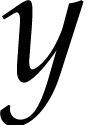 and a converter from to
  ,
then you will automatically have a converter from
to . A “distance between two formats via
a given converter” may be specified using
,
then you will automatically have a converter from
to . A “distance between two formats via
a given converter” may be specified using
(:penalty floating-point-distance)
Further options for converters are:
(:require cond)
(:option option default-value)
The first option specifies a condition which must be satisfied for this converter to be used. This option should be specified as the first or second option and always after the :penalty option. The :option option specifies an option for the converter with its default value. This option automatically become a user preference and it will be passed to all converters with options.