 Standard environment variables
The way TeXmacs typesets documents is influenced by so called environment variables. The style-sheet language uses a so called environment (or context) to store both environment variables and macros. The environment variables are subdivided into two categories: built-in variables and additional variables provided by style files. Built-in variables usually affect the layout, while additional variables mostly serve computational purposes. In the next sections of this chapter, we will describe all built-in environment variables.
A typical built-in environment variable is color.
The value of an environment variable may be changed
permanently using
Some colored text.
Some <with|color|dark red|colored> text.
Counters are typical environment variables defined in style-sheets.
-
A weirdly
-
numbered list…
<enumerate|<document|<item>A weirdly|<assign|item-nr|3><item>numbered list…>>
The typesetting language uses dynamic scoping of
variables. That means that macros can access and modify variables in
their calling context. In the previous example, the  (uses
(uses
Each document comes with an initial environment with the initial values of environment values, i.e. their values just before we typeset the document. If an environment variable does not occur in the initial environment, then its initial value defaults to its value after typesetting the document style and possible additional packages. The initial environment before typesetting the style files and packages is built-in into the editor.
Some variables, like header and footer variables, must be set inside the document, their initial environment value is ignored. Generally, they should be set by header and sectioning markup.
1.General environment variables
 text
text
This very important environment variable determines the current mode. There are four possible values: text (text mode), math (mathematical mode), prog (programming mode) and src (source mode). The behaviour of the editor (menus, keystrokes, typesetting, etc.) depends heavily on the mode. For example, the following code may be used in order to include a mathematical formula inside text:
The formula  is well known.
The formula <math|a<rsup|2>+b<rsup|2>=c<rsup|2>> is well known.
Some other environment variables (mainly the language and the font) also depend on the current mode (in this context, the source mode always behaves in a similar way as the text mode). During copy&paste and search&replace operations, TeXmacs tries to preserve the mode.
languageenglish
math-languagetexmath
scheme
A second major environment variable is the current language. In fact, there are three such environment variables: one for each mode. The language in which content is written is responsible for associating a precise semantics to the content. This semantics is used for different purposes:
-
The language may specify rules for typesetting content. For instance, the text language specifies punctuation and hyphenation rules. Similarly the mathematical language containns spacing information for mathematical operators.
-
Several editing operations depend on the current language: when performing a search or replace operation, TeXmacs is both mode and language sensitive. Similarly, the text language determines the dictionary to use when spell-checking the document.
-
The language controls (among other parameters like the mode and the document format) the way content is being converted from one context to another.
Currently, no real language-dependent conversions have been implemented yet. But in the future one may imagine that copying a piece of English text to a document written in French will perform an automatic translation. Similarly, a mathematical document might be converted from infix to postfix notation.
-
The programming language determines the current scripting language in use. Other scripting languages than
Scheme are currently only used for interactive sessions, but primitives likeextern might become language-sensitive in the future.
At the moment, the current language is mainly used as a hint for indicating the semantics of text: it is not required that a text written in English contains no spelling errors, or that a formula written in a mathematical language is mathematically or even syntactically correct. Nevertheless, the editor is intended to enforce correctness more and more, especially for mathematics.
The language may be specified globally for the whole document in
default
This environment variables is used in addition to the prog-language
variable in order to determine a concrete implementation as well as
a particular instance of the current programming language. For
instance, in case of the
This variable determines the magnification which is applied to all content. Magnifications bigger than one are typically useful for presentations (from slides or from a laptop):
normal<htab|5mm><with|magnification|2|big><htab|5mm><with|magnification|3|huge>
The magnification should not be confused with the font
size: contrary to the magnification, the font size may also
affect the shapes of the glyphs. The magnification is usually
specified for the entire document in
white
black
The current foreground color of text and graphics, as specified in
false
This flag determines whether we are editing normal text or a
style-sheet. The source tree or preamble mode may be selected in
short
This variable controls the rendering of informative flags, which are for instance used to indicate the locations of otherwise invisible labels or typesetting directives. The info-flag may take the values none, short and detailed:
<with|info-flag|none|Label 1<label|flag-label-1>>, <with|info-flag|short|Label 2<label|flag-label-2>>, <with|info-flag|detailed|Label 3<label|flag-label-3>>.
Usually, the rendering of informative flags is specified
document-wide in
2.Specifying the current font
In this section, we describe the environment variables which control
the rendering of fonts. Font properties may be controlled globally for
the whole document in
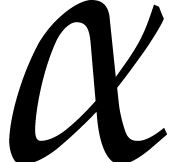
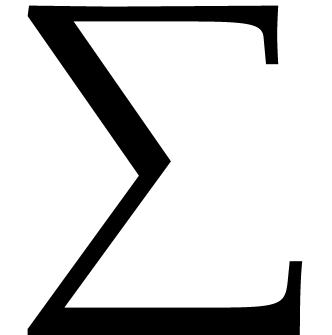
From an abstract point of view, a font is defined to be a
graphically consistent way of rendering strings. Fonts are usually
made up from glyphs like “x”, “ffi”,
“ ”, “
”, “ ”,
etc. When rendering a string, the string is decomposed
into glyphs so as to take into account ligatures (like fi, fl, ff,
ffi, ffl). Next, the individual glyphs are positioned while taking
into account kerning information (in “xo” the
“o” character is slightly shifted to the left so as to
take profit out of the hole in the “x”). In the case of
mathematical fonts, TeXmacs also provides a coherent rendering for
resizable characters, like the large brackets in
”,
etc. When rendering a string, the string is decomposed
into glyphs so as to take into account ligatures (like fi, fl, ff,
ffi, ffl). Next, the individual glyphs are positioned while taking
into account kerning information (in “xo” the
“o” character is slightly shifted to the left so as to
take profit out of the hole in the “x”). In the case of
mathematical fonts, TeXmacs also provides a coherent rendering for
resizable characters, like the large brackets in
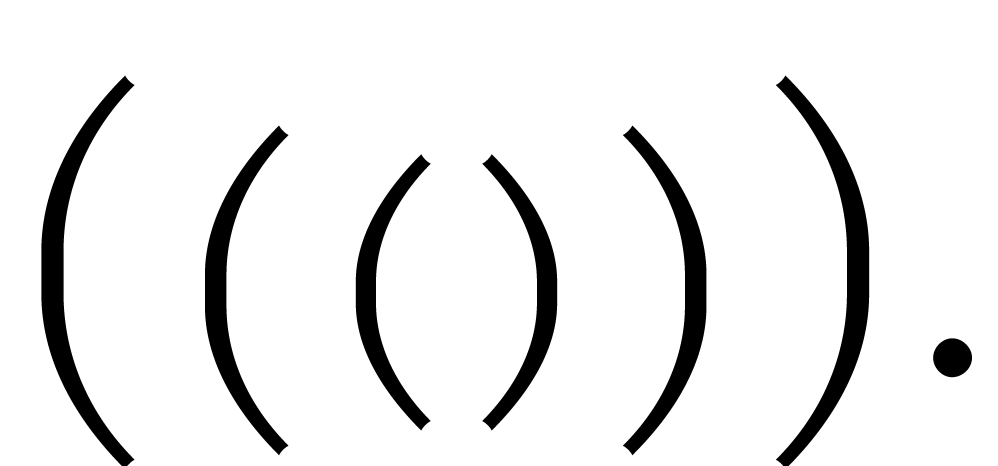
Similarly, a font family is a family of fonts with different characteristics (like font weight, slant, etc.), but with a globally consistent rendering. One also says that the fonts in a font family “mix well together”. For instance, the standard computer modern roman font and its bold and italic variants mix well together, but the computer modern roman font and the Avant Garde font do not.
roman
These variables control the main name of the font, also called the font family. For instance:
Similarly, TeXmacs supports various mathematical fonts:
Roman:
Adobe: 
New roman: 
Concrete: 
Most fonts only implement a subset of all Unicode glyphs. Sometimes, the user might wish to combine several fonts to cover a larger subset. For instance, when specifying roman,IPAMincho or cjk=IPAMincho,roman as the font name, ordinary text and mathematics will be typeset using the default roman font, whereas Chinese text will use the IPAMincho font. Similarly, when specifying math=Stix,roman as the font name, ordinary text will be typeset using the default roman font, but mathematical formulas using the Stix font.
rm
This variable selects a variant of the major font, like a sans serif font, a typewriter font, and so on. As explained above, variants of a given font are designed to mix well together. Physically speaking, many fonts do not come with all possible variants (sans serif, typewriter, etc.), in which case TeXmacs tries to fall back on a suitable alternative font.
Typical variants for text fonts are rm (roman), tt (typewriter) and ss (sans serif):
roman, typewriter and
Sans serif formula: 
medium
The font series determines the weight of the font. Most fonts only provide regular and bold font weights. Some fonts also provide light as a possible value.
medium, bold
right
The font shape determines other characters of a font, like its slant, whether we use small capitals, whether it is condensed, and so on. For instance,
The base font size is specified in pt units and is usually invariant throughout the document. Usually, the base font size is 9pt, 10pt, 11pt or 12pt. Other font sizes are usually obtained by changing the magnification or the relative font-size.
9pt, 10pt, 11pt, 12pt
The real font size is obtained by multiplying the font-base-size
by the font-size multiplier. The
following standard font sizes are available from
|
||||||||||||||||||||
From a mathematical point of view, the multipliers are in a
geometric progression with factor 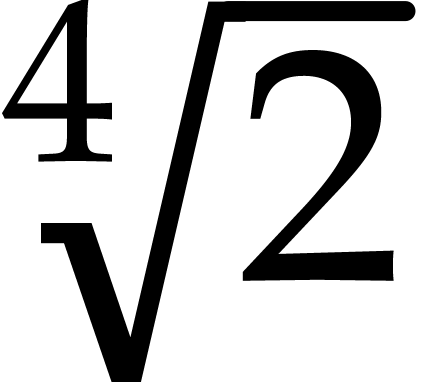 . Notice
that the font size is also affected by the index level.
. Notice
that the font size is also affected by the index level.
600
The rendering quality of raster fonts (also called Type 3 fonts),
such as the fonts generated by the
3.Typesetting mathematics
The index level increases inside certain mathematical constructs such as indices and fractions. When the index level is high, formulas are rendered in a smaller font. Nevertheless, index levels higher than 2 are all rendered in the same way as index level 2; this ensures that formulas like
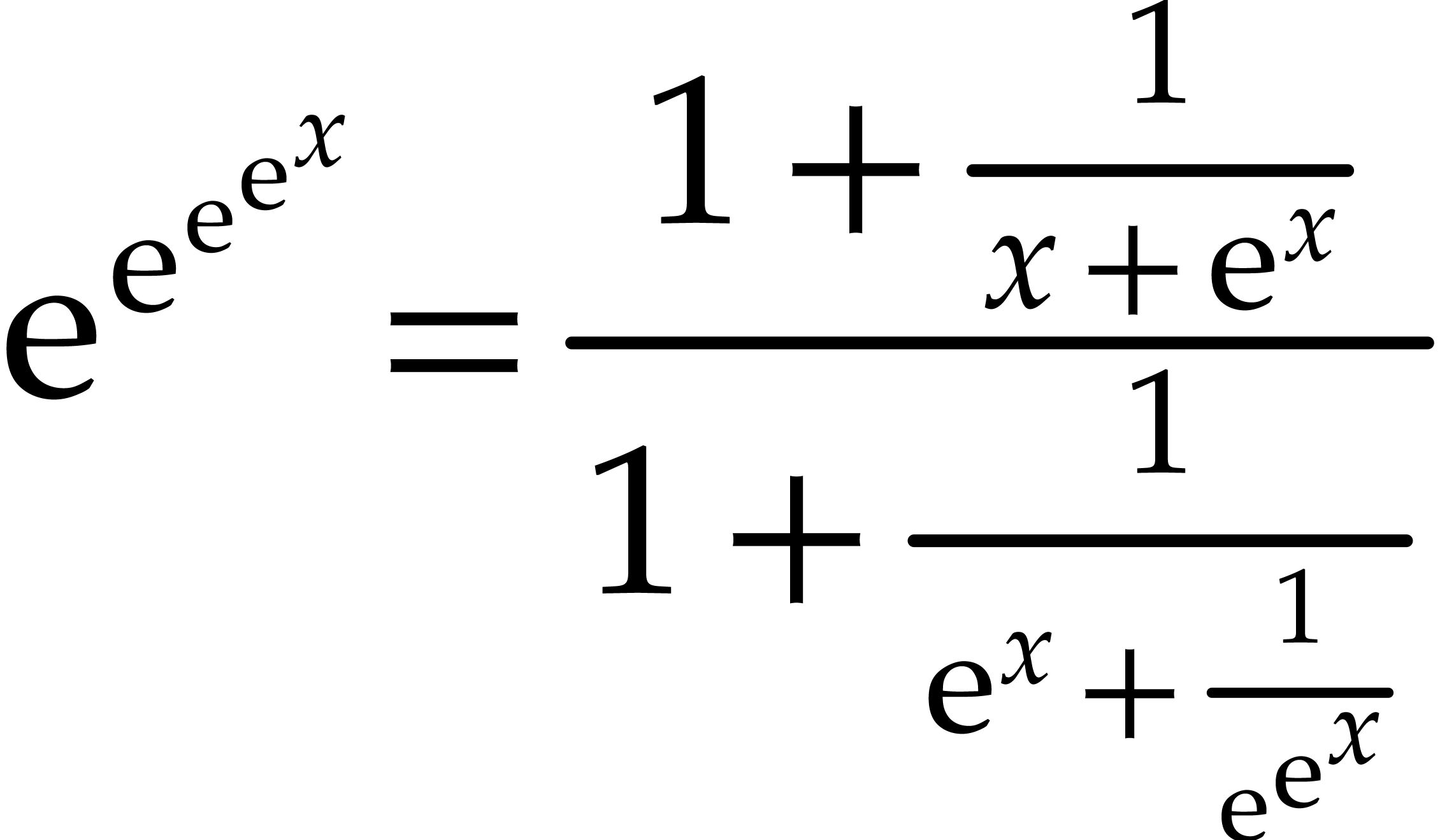
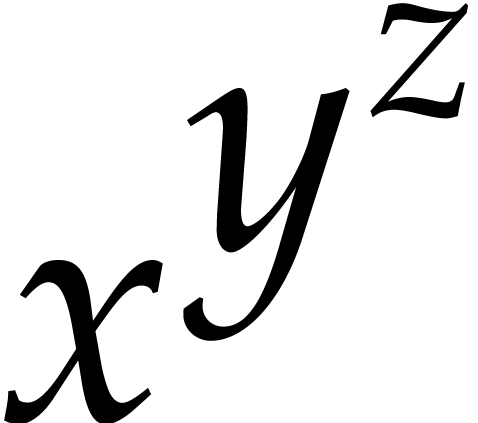
remain readable. The index level may be manually changed in

false
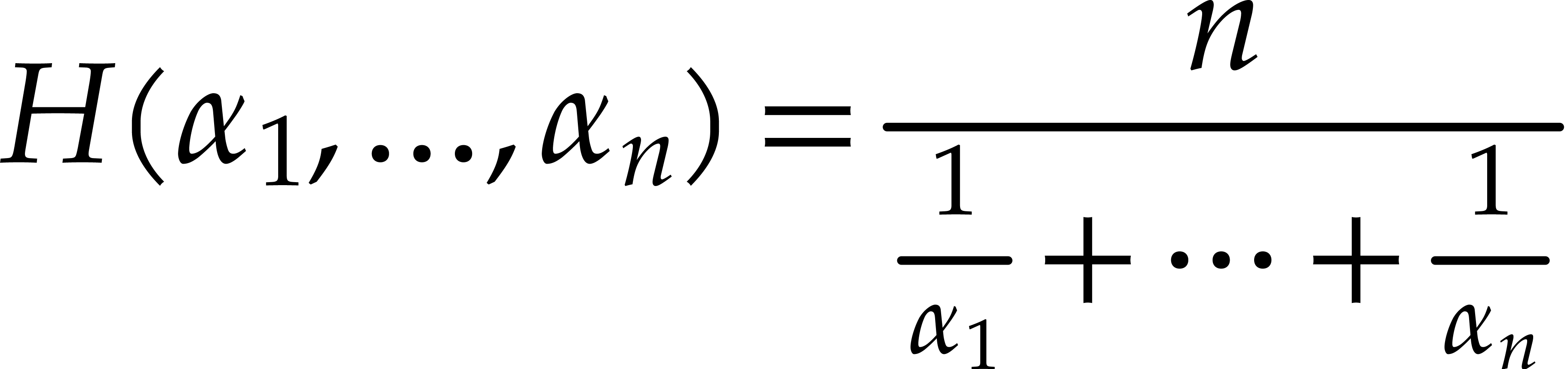
This environement variable controls whether we are in display style or not. Formulas which occur on separate lines like

are usually typeset in display style, contrary to inline formulas
like  . As you notice, formulas in display
style are rendered using a wider spacing. The display style is
disabled in several mathematical constructs such as scripts,
fractions, binomial coefficients, and so on. As a result, the double
numerators in the formula
. As you notice, formulas in display
style are rendered using a wider spacing. The display style is
disabled in several mathematical constructs such as scripts,
fractions, binomial coefficients, and so on. As a result, the double
numerators in the formula
 false
false
By default, formulas like  are typeset using
a nice, wide spacing around the
are typeset using
a nice, wide spacing around the 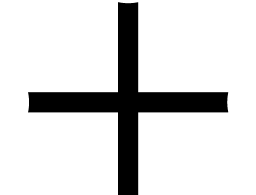 symbol. In
formulas with scripts like
symbol. In
formulas with scripts like  the readability
is further enhanced by using a more condensed spacing inside the
scripts: this helps the reader to distinguish symbols occurring in
the scripts from symbols occurring at the ground level when the
scripts are long. The default behaviour can be overridden using
the readability
is further enhanced by using a more condensed spacing inside the
scripts: this helps the reader to distinguish symbols occurring in
the scripts from symbols occurring at the ground level when the
scripts are long. The default behaviour can be overridden using
0
For a high quality typesetting of fraction, it is good to avoid
subscripts in numerators to descend to low and superscripts in
denominators to ascend to high. TeXmacs therefore provides an
additional environment variable math-vpos
which takes the value 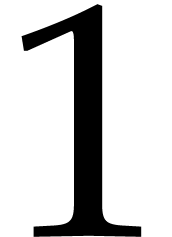 inside numerators,
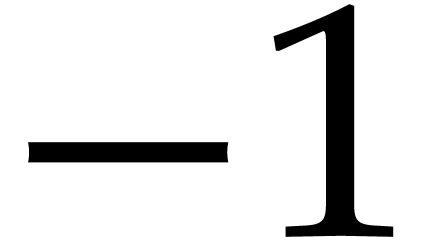 inside denominators and
 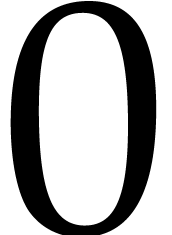 otherwise. In order to see the effect the different settings,
consider the following formula:
otherwise. In order to see the effect the different settings,
consider the following formula:
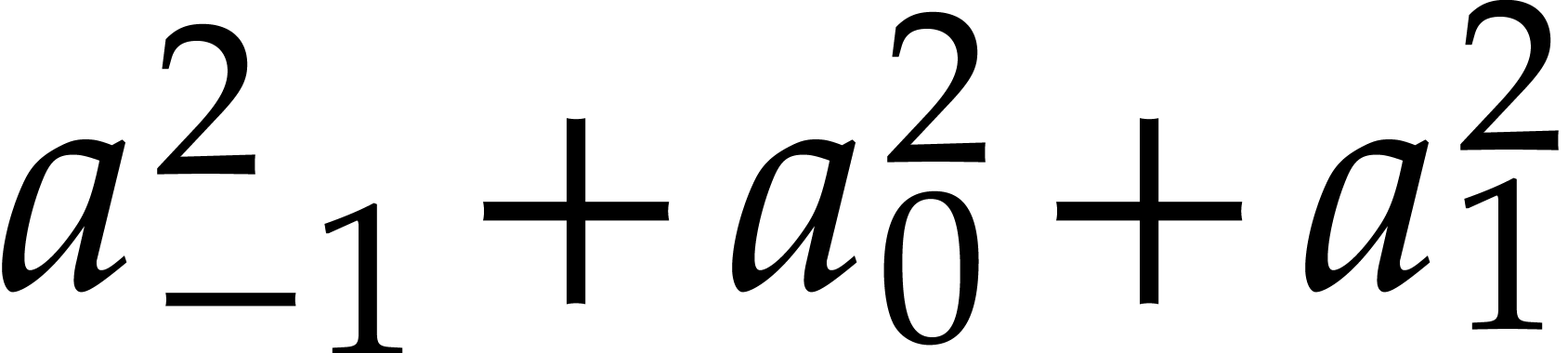

In this example, the grouping is necessary in order to let the
different vertical positions take effect on each 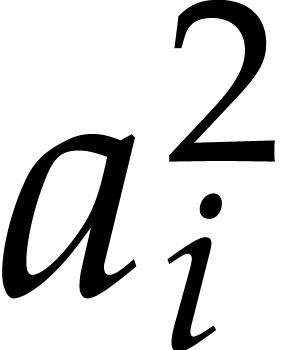 .
Indeed, the vertical position is uniform for each horizontal
concatenation.
.
Indeed, the vertical position is uniform for each horizontal
concatenation.
4.Paragraph layout
justify
This environment variable specifies the alignment of the different lines in a paragraph. Possible values are left, center, right and justify:
|
||||
1000.0
When using the justified alignment mode, it sometimes occurs that certain lines need to be stretched a lot, thereby leaving abnormally large spaces in the middle of those lines. This is typically the case inside bibliographies with unbreakable hyperlinks. The par-flexibility variable specifies a threshold above which justification of a line is abandoned. More precisely, we switch to left alignment whenever the remaining space on a line exceeds par-flexibility times the maximal amount of stretching which still “looks nice” for the given font.
|
||
normal
This parameter controls the quality of the hyphenation algorithm. Possible values are normal and professional. The professional hyphenation algorithm uses a global algorithm on the entire paragraph, whereas the normal one uses a faster first-fit algorithm.
auto
This environment variable controls the width of paragraphs. By default, it is automatically determined as a function of the page (or screen) size and margins.
par-left0cm
0cm
These environment variables specify absolute left and right margins for the paragraph, with respect to the default left and right margins (which are determined as a function of the page layout). For instance:
This text uses the default margins.
This text uses a left margin of 1cm
This text uses a left margin of 2cm
This text uses a left margin of 3cm
The left and right margins of this text have both been set to 3cm.
Environments like
<assign|quote-env|
<macro|body|<\surround|
<vspace*|0.5fn>
|
<right-flush><vspace|0.5fn>
|
<with|par-left|<plus|par-left|3fn>|par-right|<plus|par-right|3fn>|par-first|0fn|par-par-sep|0.25fn|body>
>
>>
1.5fn
The par-first parameter specifies the additional indentation which is used for the first line of the paragraph. The aim of first indentations is to indicate the starts of new paragraphs. An alternative technique is the use of vertical whitespace.
0.2fn
The sum of the font size and par-sep determines the ideal distance between two successive base lines in a paragraph (also called the “base line skip”). Of course, when the lines contain large boxes, then this distance may need to be increased. When 1fn for par-sep, one may for instance produce documents with a double interline space:
A double interline space corresponds to par-sep 1fn.
Double interline spaces are often used by lazy people who want to
pretend that they have written many pages. They generally do not
care about tropical rain forests.
1fn.
Double interline spaces are often used by lazy people who want to
pretend that they have written many pages. They generally do not
care about tropical rain forests.
In the case when two successive lines use different base line skips, then the maximal value is used in order to compute the ideal distance between their baselines. This allows for a reasonable spacing when the font size is changed from one paragraph to another:
Normal text.
Some very large text.
And back to normal.
0.025fn*
This parameter corresponds an additional stretchable amount of
whitespace between successive lines in a paragraph. Setting par-line-sep to a small stretchable value which
defaults to allows the page breaker to
correctly stretch pages which contain a very long textual paragraph.
Indeed, par-line-sep vanishes, then the
height of a textual paragraph is of the form 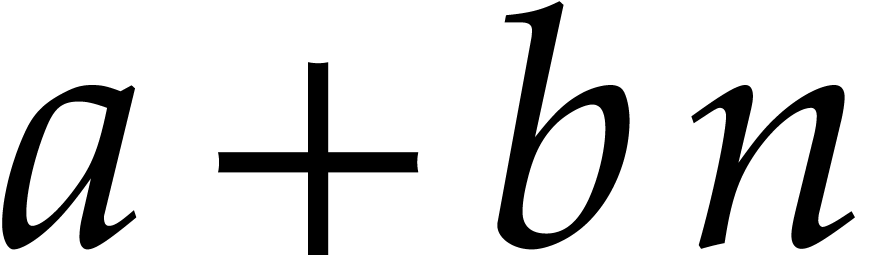 ,
where
,
where 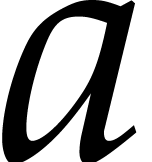 and
and 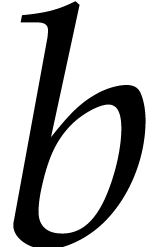 are
constants and
are
constants and 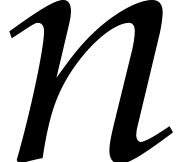 is the number of lines. There
is no reason why the usable height of a page should be of this form.
is the number of lines. There
is no reason why the usable height of a page should be of this form.
0.5fn*
The par-par-sep parameter specifies the amount of vertical whitespace which separates two successive paragraphs. This space is determined in stretchable length units. By default, TeXmacs does not use any whitespace between successive paragraphs, except when no nice page breaks could be found (this explains the use of the fn* length unit). Starts of new paragraphs are rather indicated through the use of first indentations (see table ?).
In the case when two successive paragraph use different paragraph separations, then the maximum of the two is taken. In fact, the par-par-sep length is added to both the vertical spacing before and the vertical spacing after the paragraph.
par-hor-sep0.5fn
0.2fn
When a paragraph contains several exceptionally large boxes, then TeXmacs attempts to “shove successive lines into another” as long as none of the boxes collide:
Consider a fraction which decends more than usual like 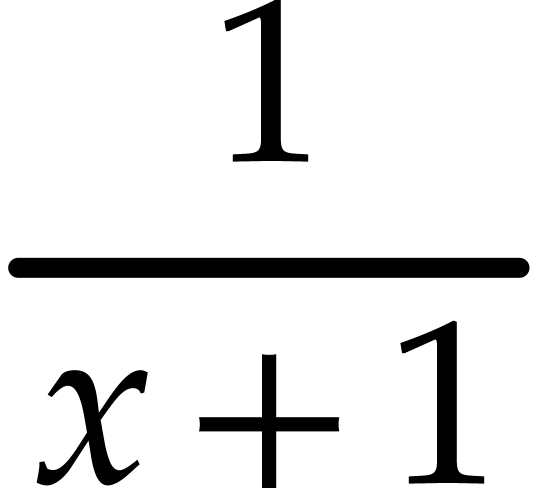 at the end of a line and an expression like
 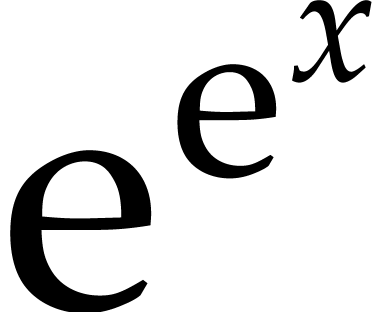 which is higher than usual.
When these expressions occur at different places, then TeXmacs tries to render the successive lines in a compact manner.
In the case of a fraction and an
exceptionally high expression at the wrong place, like the
expression here, the boxes are separated by
env-ver-sep.
As soon as the horizontal distance between two large boxes is less than par-hor-sep, then they are considered to be in collision. In that case, the vertical distance between them must be at least par-ver-sep. Also, the amount of showing never exceeds 1ex.
When using an interline space of 1.5 or 2, the default value of par-ver-sep allows the user to type larger formulas in the text while preserving a uniform layout. When using a small par-sep and a large par-ver-sep, the distance between two successive lines remains small, except when their contents are horizontally close. This may for instance be used to reduce the space between a short like followed by a centered equation.
0.2fn
This parameter controls the amount of vertical space between successive footnotes.
1
This environment variable specifies the number of columns into which the text is being typeset. Different numbers of columns may be used successively in the same document.
2fn
This environment variable specifies the amount of horizontal whitespace which separates different columns in multi-column mode.
5.Page layout
In this section, we describe how TeXmacs fills pages with typesetted content. Besides specifying the settings on how to print a document, the user may also determine the way pages should be rendered on screen. It should be noticed that the number of environment variables is redundant in the sense that some variables are computed as a function of other ones. For instance, by default, the paragraph width is computed as a function of the page size and the left and right margins.
Paper specific variables
a4
Specify the size of a page when printing out. Most standard formats
are available in
portrait
The orientation of pages can be either portrait or landscape.
0
The current page number. This environment variable should be
manipulated with care, since it is not yet available at typesetting
time. For a reliable determination of page numbers, one may combine
the
This environment variable really contains the macro which is used
for rendering the page-number. By default, it renders page-nr.
The macro takes no arguments. In order to simulate a document whose
first page number is 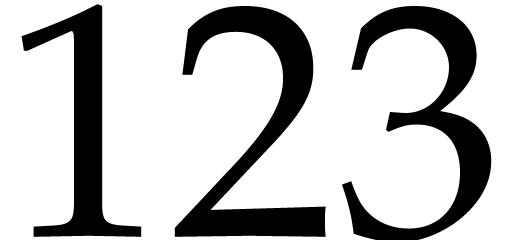 , one may redefine
<assign|page-the-page|<macro|<plus|page-nr|122>>>
optimal
This parameter specifies the page breaking algorithm. The default optimal algorithm takes into account the global document and tries hard to avoid bad page breaks. The alternative sloppy algorithm uses a fast first-fit algorithm, but produces bad page break with a higher probability. The medium quality algorithm is the same as the optimal algorithm, except for two column content.
1.0
This parameter specifies how much stretchable spaces may be extended
or reduced in order to fill pages which are too short or too long. A
page flexibility of allows spaces to be
stretched to their minimal and maximal values. A page flexibility of
prevents spaces to be stretched. For other
values of page-flexibility the behaviour
is linear.
1fn
In the case when it is very hard to find good page breaks, this parameter specifies an additional amount of space by which a page is allowed to be reduced.
0fn
In the case when it is very hard to find good page breaks, this parameter specifies an additional amount of space by which a page is allowed to be extended.
Screen specific variables
papyrus
This environment variable, which is initialized using
- paper
-
Page breaks are visually indicated on the screen. This mode is useful for ajusting the final version of a document before printing or sending it to a publisher. However, the use of this mode slows down the editor since every modification in the document triggers the page-breaking algorithm.
Notice also that the mere selection of this mode does not imply the screen margins and page decorations to be as on paper. In order to previsualize a document in a fully realistic way, you should also set
Document →Page →Screen margins →Show header and footer andDocument →Page →Screen margins →Margins as on paper . - papyrus
-
The paragraph width is the same as on paper, but page breaking is disabled. This mode is most useful during the editing phase of a document which will ultimately be printed out. It combines a reasonable editing speed with realistic line breaks.
- automatic
-
The paragraph width is as large as possible so as to fit into the current window and page breaking is disabled. This setting, which makes optimal use of the available space on your screen, is useful for documents which are not intended to be printed out. It may for instance be selected when using TeXmacs as a browser or as an interface to computer algebra systems.
10cm
In automatic mode, this environement variable contains the width of the screen.
10cm
In automatic mode, this environement variable contains the height of the screen.
true
This flag specifies whether the screen margins are manually specified by the user, or whether they are the same as on paper.
page-screen-left5mm
page-screen-right5mm
page-screen-top15mm
15mm
When page-screen-margin is true, then these environment variables determine the margins which are to be used for rendering on the screen.
false
This flag determines whether the page headers and footers should be visible on the screen. When set to true, it should be noticed that the headers and footers are not always correctly updated when editing. In the case when you suspect them to be wrong, refreshing the display by scrolling down and up should display the correct values.
Specifying the margins
The parameters for page margins are represented schematically at the left hand side in figure ?. One may either specify the paragraph width as a function of the left and right margins, or vice versa. The left and right margins may depend on whether the page number is odd or even.
page-width-marginfalse
false
When page-width-margin is set to false, then the paragraph width par-width is determined automatically from the page size and the left and right margins. When set to true, the left and right margins are determined as a function of the page size, the paragraph width, page-odd-shift and page-even-shift. For compatability with TeX/LaTeX, it is also possible to set page-width-margin to tex, in which case the horizontal margins are determined from page-odd, page-even and par-width. The page-height-margin variable plays a similar role for the vertical margins.
page-widthauto
auto
By default, the width and height of a page are automatically determined from the page type. When page-type is set to user, then the user may manually specify the page size using page-width and page-height.
page-oddauto
auto
If page-width-margin is set to false, then page-odd and page-even specify the left margins for odd and even pages. If page-width-margin is true, then these values are computed as a function of the page size, the paragraph width, page-odd-shift and page-even-shift. When page-odd and page-even are set to auto, then a nice default left margin is determined as a function of the specified page type.
auto
If page-width-margin is set to false, then page-right specifies the right margin for odd pages. The right margin for even pages is given by the formula

If page-width-margin is true or when page-right is set to auto, then the right margin is determined in a similar way as the left margin.
page-odd-shift0mm
0mm
If page-width-margin is set to true, then the left margins for odd and even pages are determined from the page size, paragraph width and the margin shifts using the formulas

The right margin is always taken to be such that the paragraph width and the left and right margins sum up to the page width.
 |
Figure 1. Schematic
representation of the layout of pages. On the left hand
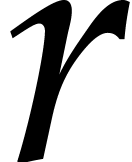
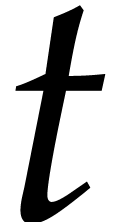
side, the parameters |
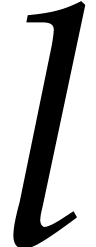 ,
,  ,
,  and
and 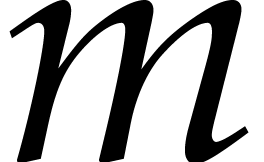 correspond to the header, footer, footnote and marginal
note separations,
correspond to the header, footer, footnote and marginal
note separations,
Page decorations
These environment variables contain the header and footer texts for odd and even pages.
page-head-sep8mm
8mm
These parameters determine the space between the main text and page
headers and footers. They correspond to the 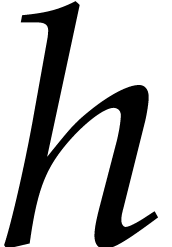 and
and 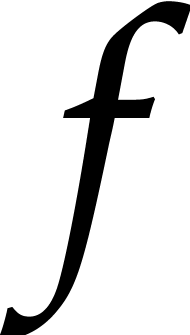 distances at the right hand side of
figure ?.
distances at the right hand side of
figure ?.
1.0fn
The separation between the main text and footnotes,
i.e. the distance 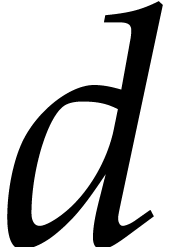 in figure ?.
7.5fn
The length of the foornote bar.
1.5fn
The separation between the main text and floating objects.
5mm
The separation between marginal notes and the main text (not implemented yet).
15mm
The width of marginal notes (not implemented yet).
6.Table layout
The environment variables for tables can be subdivided in variables
(prefixed by table-) which apply to the
whole table and those (prefixed by cell-)
which apply to individual cells. Whereas usual environment variables
are set with
Layout of the table as a whole
table-width
These parameters indicate a hint for the dimensions of the table. The table-hmode and table-vmode variables determine how to take into account these settings.
table-hmode
These parameters specify how to determine the dimensions of the table. At the moment, the values of table-hmode and table-vmode are actually ignored and table-width and table-height are interpreted as the minimal width and height of the table.
table-halignl
f
These parameters determine how the table should be aligned in the surrounding text. Possible values for table-halign are l (left), c (center) and r (right), and possible values for table-valign are t (top), f (centered at fraction bar height), c (center) and b (bottom).
In addition to the above values, the alignment can take place with respect to the baselines of particular cells. Such values for table-halign are L (align w.r.t. the left column), C (align w.r.t. the middle column), R (align w.r.t. the right column) and O (align w.r.t. the priviledged origin column table-col-origin). Similarly, table-halign may take the additional values T (align w.r.t. the top row), C (align w.r.t. the middle row), B (align w.r.t. the bottom row) and O (align w.r.t. the priviledged origin row table-row-origin).
table-row-origin0
0
Table coordinates of an priviledged “origin cell” which may be used for aligning the table in the surrounding text (see above).
table-lsep0fn
table-rsep0fn
table-bsep0fn
0fn
Padding around the table (in addition to the padding of individual cells).
table-lborder0ln
table-rborder0ln
table-bborder0ln
0ln
Border width for the table (in addition to borders of the individual cells).
n
A flag which specifies whether page breaks may occur at the middle of rows in the table. When table-hyphen is set to y, then such page breaks may only occur when
-
The table is not surrounded by other markup in the same paragraph.
-
The rows whether the page break occurs has no borders.
An example of a tabular environment which allows for page breaks is
table-min-rows
table-min-cols
table-max-rows
It is possible to specify a minimal and maximal numbers of rows or
columns for the table. Such settings constraint the behaviour of the
editor for operations which may modify the size of the table (like
the insertion and deletion of rows and columns). This is
particularly useful for tabular macros. For instance, table-min-columns
and table-max-columns are both set to
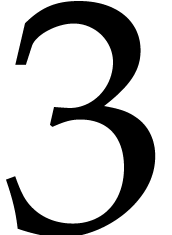 for the
Layout of the individual cells
A background color for the cell.
cell-width
Hints for the width and the height of the cell. The real width and height also depend on the modes cell-hmode and cell-vmode, possible filling (see cell-hpart and cell-vpart below), and, of course, on the dimensions of other cells in the same row or column.
cell-hpart
When the sum 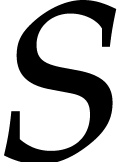 of the widths of all columns in
a table is smaller than the width
of the widths of all columns in
a table is smaller than the width 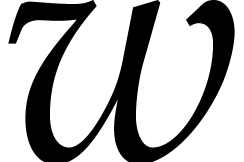 of the
table itself, then it should be specified what should be done with
the unused space. The cell-hpart
parameter specifies a part in the unusued space which will be taken
by a particular cell. The horizontal part taken by a column is the
maximum of the horizontal parts of its composing cells. Now let
of the
table itself, then it should be specified what should be done with
the unused space. The cell-hpart
parameter specifies a part in the unusued space which will be taken
by a particular cell. The horizontal part taken by a column is the
maximum of the horizontal parts of its composing cells. Now let 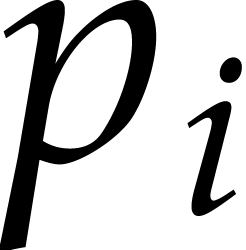 the so determined part for each column (
 ). Then the extra horizontal space which will be
distributed to this column is
). Then the extra horizontal space which will be
distributed to this column is  . A similar
computation determines the extra vertical space which is distributed
to each row.
. A similar
computation determines the extra vertical space which is distributed
to each row.
cell-hmodeexact
exact
These parameters specify how to determine the width and the height of the cell. If cell-hmode is exact, then the width is given by cell-width. If cell-hmode is min or max, then the width is the minimul resp. maximum of cell-width and the width of the content. The height is determined similarly.
cell-halignl
B
These parameters determine the horizontal and vertical alignment of the cell. Possible values of cell-halign are l (left), c (center), r (right), . (decimal dot), , (decimal comma) and R (vertical baseline). Possible values of cell-valign are t (top), c (center), b (bottom) and B (baseline).
cell-lsep0fn
cell-rsep0fn
cell-bsep0fn
0fn
The amount of padding around the cell (at the left, right, bottom and top).
cell-lborder0ln
cell-rborder0ln
cell-bborder0ln
0ln
The borders of the cell (at the left, right, bottom and top). The
displayed border between cells 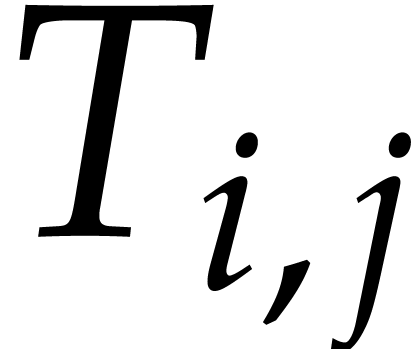 and
and 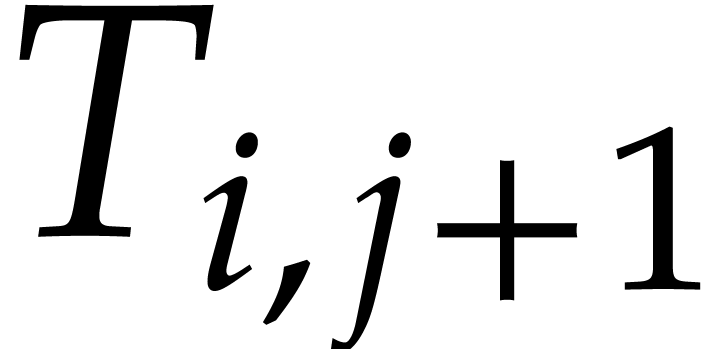 at positions
 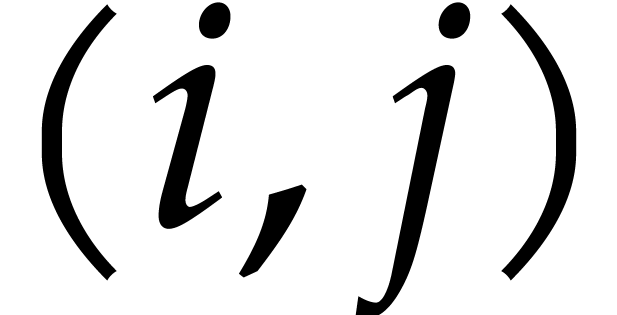 and
and 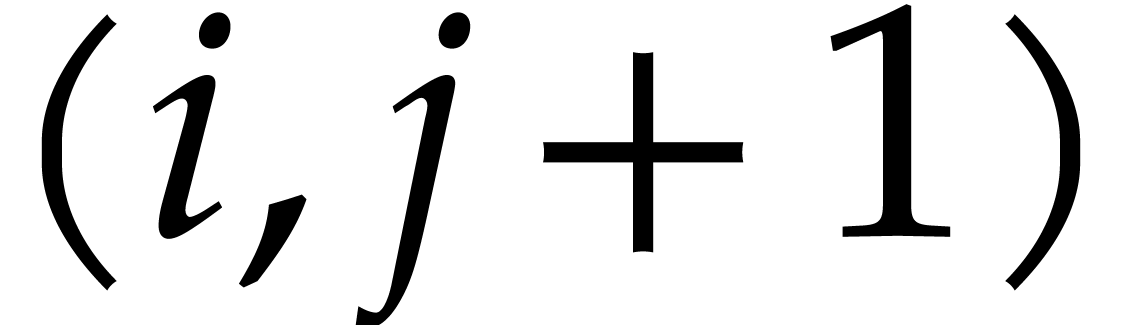 is the maximum of the borders between the right border
of and the left border of .
Similarly, the displayed border between cells
and
is the maximum of the borders between the right border
of and the left border of .
Similarly, the displayed border between cells
and 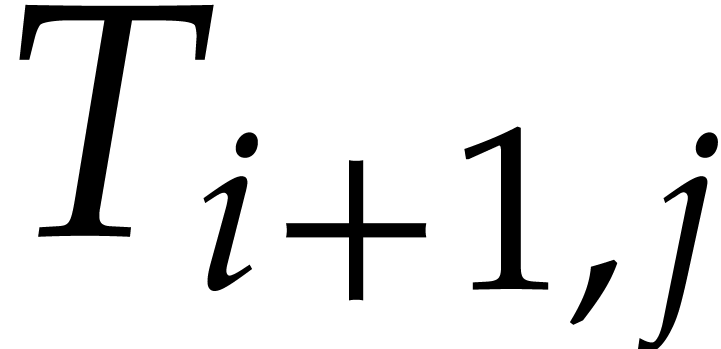 is the maximum of the bottom border of
and the top border of .
is the maximum of the bottom border of
and the top border of .
a
As described above, the dimensions and the alignment of a cell may depend on the dimensions of its content. When cells contain text boxes, the vertical bounding boxes of such text may vary as a function of the text (the letter “k” resp. “y” ascends resp. descends further than “x”). Such differences sometimes leads to unwanted, non-uniform results. The vertical cell correction allows for a more uniform treatment of text of the same font, by descending and/or ascending the bounding boxes to a level which only depends on the font. Possible values for cell-vcorrect are n (no vertical correction), b (vertical correction of the bottom), t (vertical correction of the top), a (vertical correction of bottom and the top).
n
By default, the cells contain inline content which is not
hyphenated. By selecting
cell-row-span1
1
Certain cells in a table are allowed to span over other cells at their right or below them. The cell-row-span and cell-col-span specify the row span and column span of the cell.
This environment variable may contain a decorating table for the
cell. Such a decoration enlarges the table with extra columns and
cells. The
portrait
Other orientations for cells than portrait have not yet been implemented.
cell-row-nr1
1
In the future, these environment variables should contain the current cell position during the typesetting process.
7.Editing source trees
The different rendering styles for source trees are described in more detail in the section about the global presentation of source trees. The corresponding environment variables are briefly described here.
angular
The principal rendering style for source trees as specified in
normal
How to render special tags like
normal
How compact should tags be rendered, as specified in
compact
The rendering style of closing tags as specified in
8.Miscellaneous environment variables
The following miscellaneous environment variables are mainly intended for internal use:
true
This flag specifies whether auxiliary content has to be saved along with the document.
5
The shrinking factor which is used for rendering.
false
This flag disables first indentation for the next paragraph.
This variable us used during the typsetting of tables in order to store the with-settings which apply to the current cell.
atom-decorations
line-decorations
page-decorations
xoff-decorations
These environment variables store auxiliary information during the typsetting of decorations.