 The TeXmacs format
1.TeXmacs trees
All TeXmacs documents or document fragments can be thought of as trees. For instance, the tree
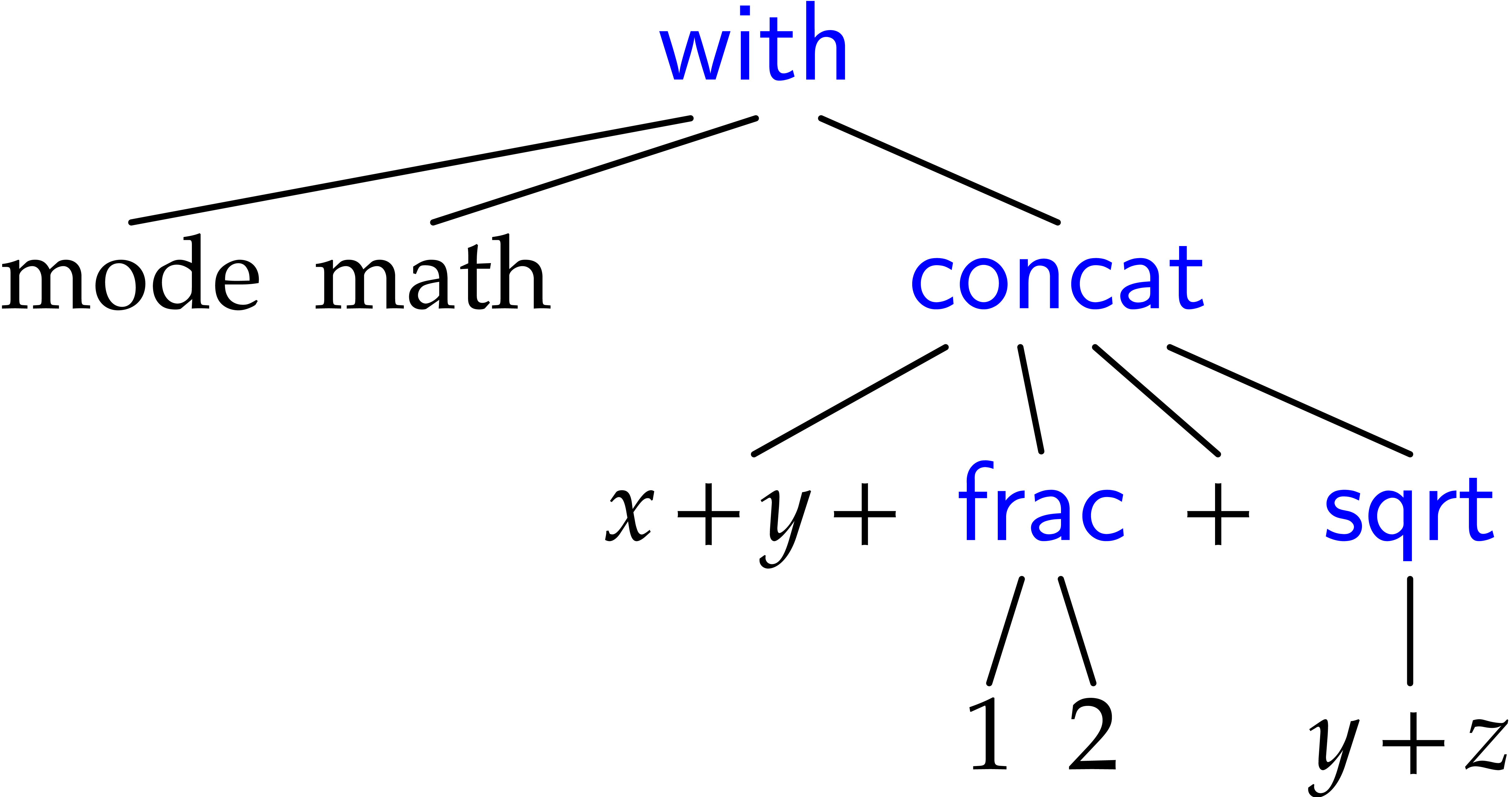
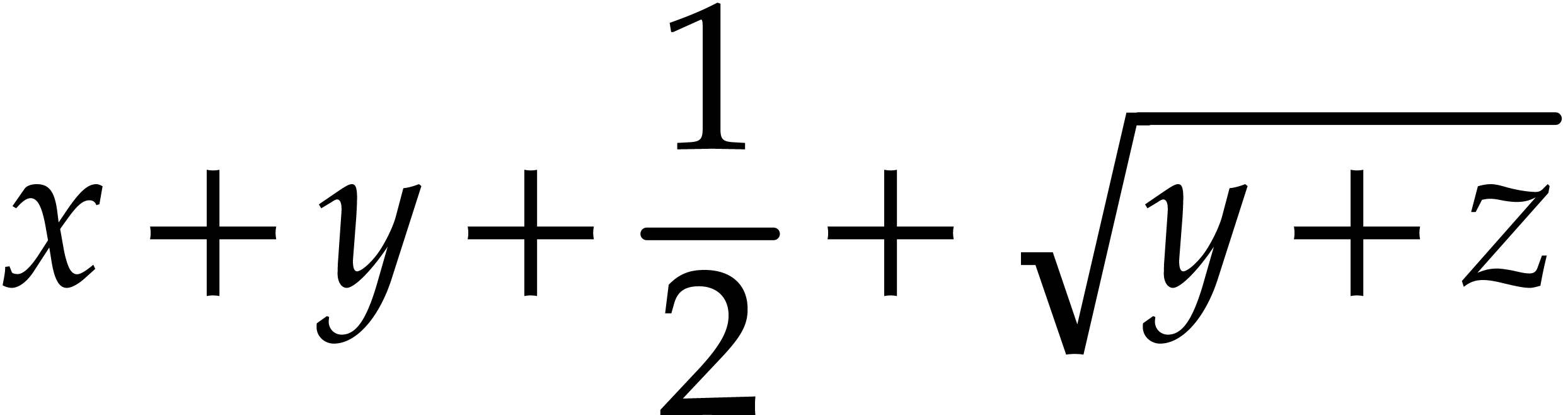
typically represents the formula
 |
(1) |
Internal nodes of TeXmacs trees
Each of the internal nodes of a TeXmacs tree is a string symbol and each of the leafs is an ordinary string. A string symbol is different from a usual string only from the efficiency point of view: TeXmacs represents each symbol by a unique number, so that it is extremely fast to test weather two symbols are equal.
Leafs of TeXmacs trees
Currently, all strings are represented using the universal TeXmacs
encoding. This encoding coincides with the Cork font encoding for
all characters except “<” and
“>”. Character sequences starting with
“<” and ending with “>”
are interpreted as special extension characters. For example, <alpha> stands for the letter 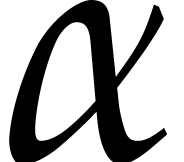 .
The semantics of characters in the universal TeXmacs encoding does not
depend on the context (currently, cyrillic characters are an
exception, but this should change soon). In other words, the universal
TeXmacs encoding may be seen as an analogue of Unicode. In the future,
we might actually switch to Unicode.
.
The semantics of characters in the universal TeXmacs encoding does not
depend on the context (currently, cyrillic characters are an
exception, but this should change soon). In other words, the universal
TeXmacs encoding may be seen as an analogue of Unicode. In the future,
we might actually switch to Unicode.
The string leafs either contain ordinary text or special data. TeXmacs supports the following atomic data types:
- Boolean numbers
-
Either true or false.
- Integers
-
Sequences of digits which may be preceded by a minus sign.
- Floating point numbers
-
Specified using the usual scientific notation.
- Lengths
-
Floating point numbers followed by a length unit, like 29.7cm or 2fn.
Serialization and preferred syntax for editing
When storing a document as a file on your hard disk or when copying a
document fragment to the clipboard, TeXmacs trees have to be
represented as strings. The conversion without loss of information of
abstract TeXmacs trees into strings is called serialization
and the inverse process parsing. TeXmacs provides three ways
to serialize trees, which correspond to the standard TeXmacs
format, the XML format and the
However, it should be emphasized that the preferred syntax for
modifying TeXmacs documents is the screen display inside the editor.
If that seems surprising to you, consider that a syntax is a way to
represent information in a form suitable to understanding and
modification. The on-screen typeset representation of a document,
together with its interactive behaviour, is a particularly concrete
syntax. Moreover, in the
2.TeXmacs documents
Whereas TeXmacs document fragments can be general TeXmacs trees,
TeXmacs documents are trees of a special form which we will describe
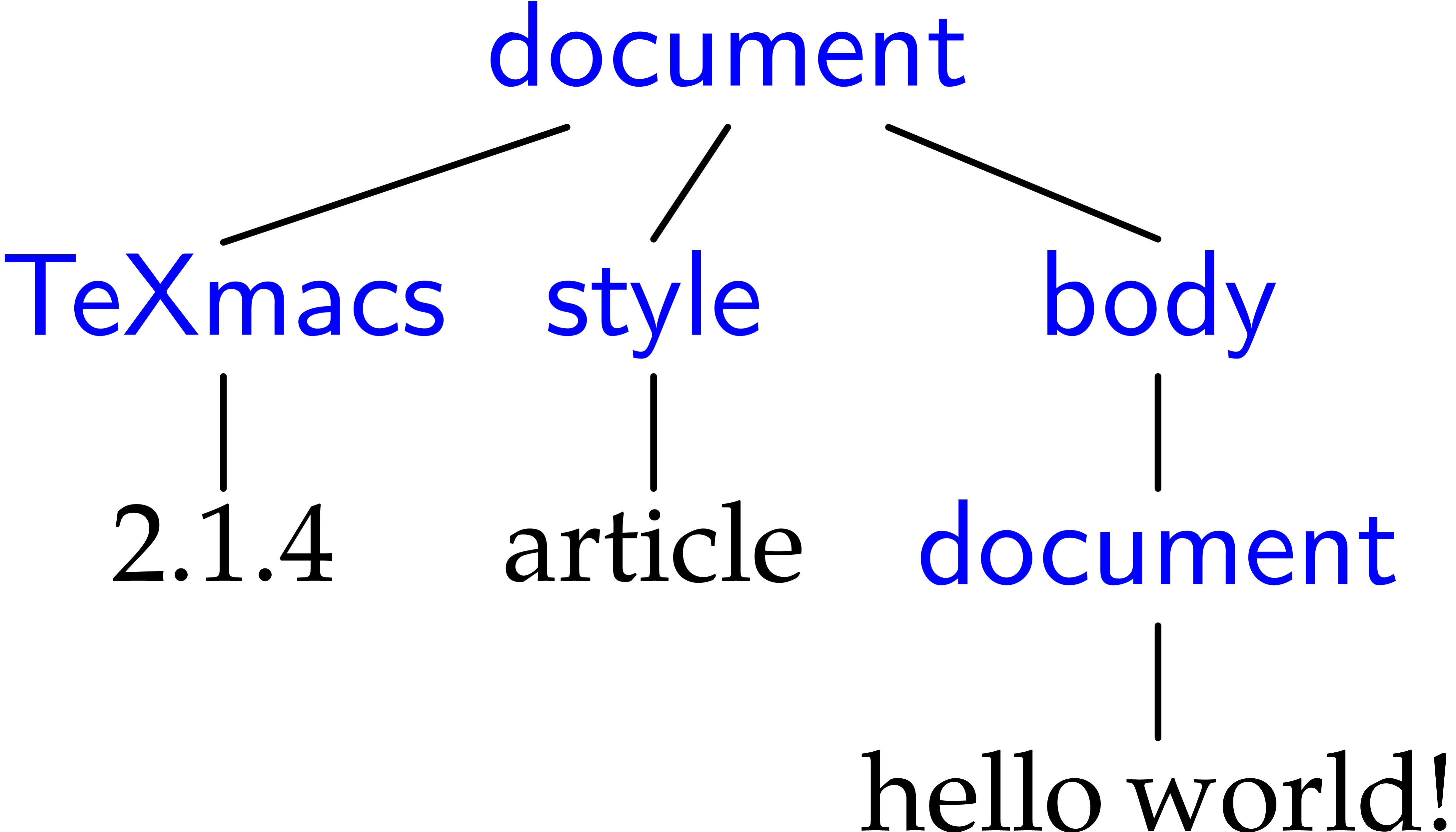
now. The root of a TeXmacs document is necessarily a
This mandatory tag specifies the version of TeXmacs which was used to save the document.
An optional project to which the document belongs.
An optional style and additional packages for the document.
This mandatory tag specifies the body of your document.
Optional specification of the initial environment for the document,
with information about the page size, margins, etc..
The table is of the form < |binding-n>. Each binding-i is of the form <
An optional list of all valid references to labels in the document. Even though this information can be automatically recovered by the typesetter, this recovery requires several passes. In order to make the behaviour of the editor more natural when loading files, references are therefore stored along with the document.
The table is of a similar form as above.
In this case a tuple is associated to each label. This tuple is
either of the form <
This optional tag specifies all auxiliary data attached to the document. Usually, such auxiliary data can be recomputed automatically from the document, but such recomputations may be expensive and even require tools which are not necessarily installed on your system. The table, which is specified in a similar way as above, associates auxiliary content to a key. Standard keys include bib, toc, idx, gly, etc.
3.Default serialization
Documents are generally written to disk using the standard TeXmacs syntax (which corresponds to the .tm and .ts file extensions). This syntax is designed to be unobtrusive and easy to read, so the content of a document can be easily understood from a plain text editor. For instance, the formula (?) is represented by
On the other hand, TeXmacs syntax makes style files difficult to read and is not designed to be hand-edited: whitespace has complex semantics and some internal structures are not obviously presented. Do not edit documents (and especially style files) in the TeXmacs syntax unless you know what you are doing.
Main serialization principle
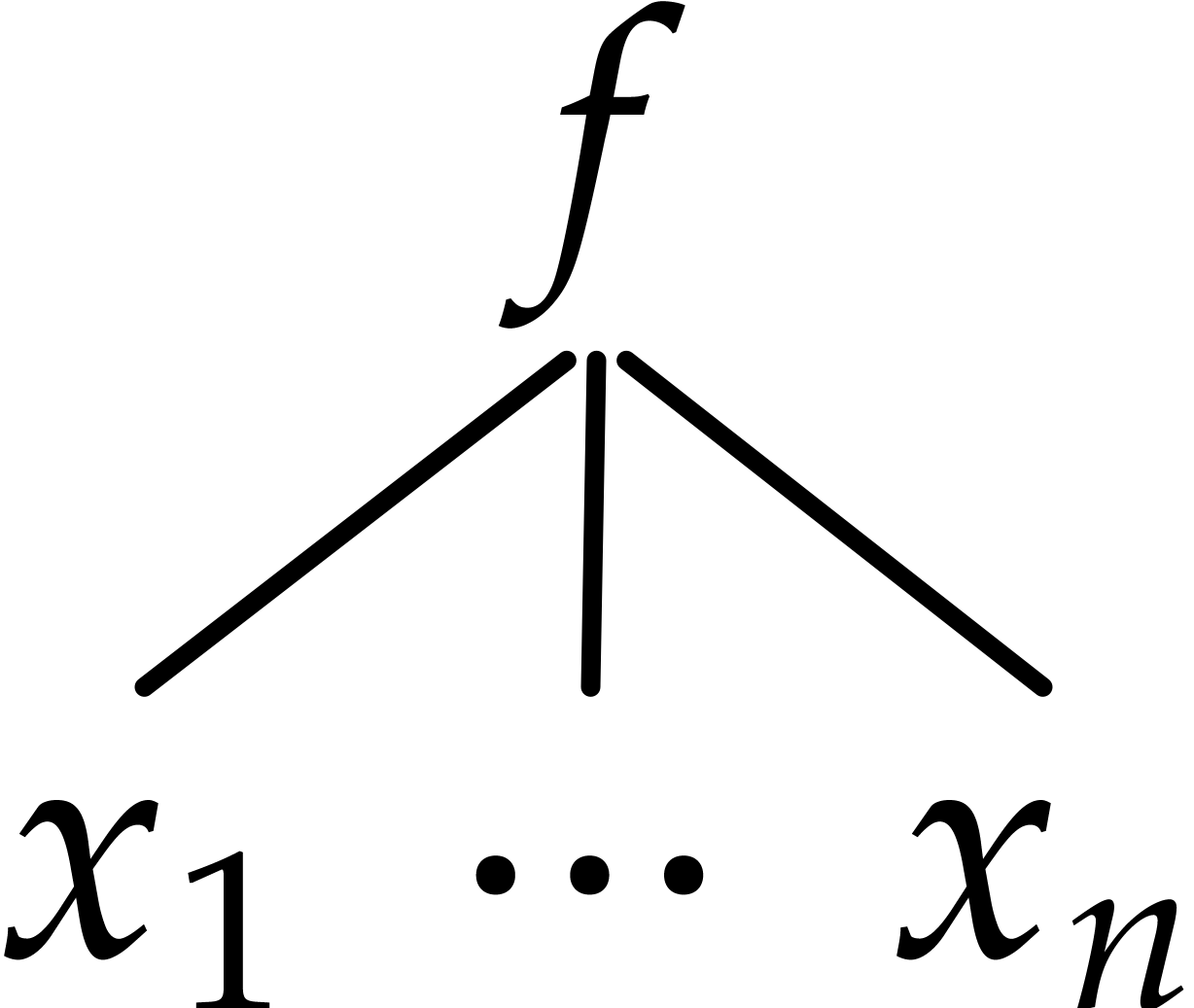
The TeXmacs format uses the special characters <, |, >, \ and / in order to serialize trees. By default, a tree like
 |
(2) |
is serialized as
<f|x1|…|xn>
If one of the arguments  is a multi-paragraph
tree (which means in this context that it contains a
is a multi-paragraph
tree (which means in this context that it contains a
<\f>
  x1
<|f>
  …
<|f>
  xn
</f>
In general, arguments which are not multi-paragraph are serialized using the short form. For instance, if n=5 and x3 and x5 are multi-paragraph, but not x1, x2 and x4, then (?) is serialized as
<\f|x1|x2>
  x3
<|f|x4>
  x5
</f>
The escape sequences \<less\>, \|,
\<gtr\> and \\ may be used to
represent the characters <, |, > and \. For instance, 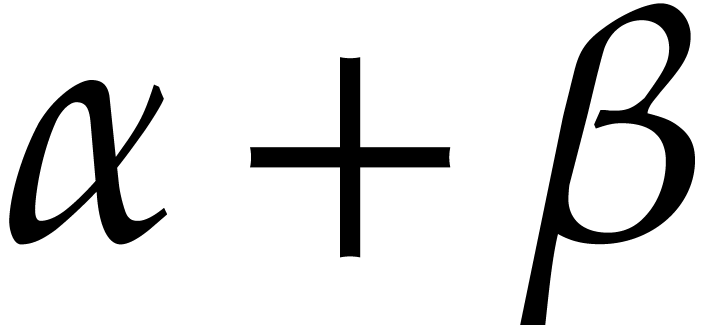 is serialized as \<alpha\>+\<beta\>.
Formatting and whitespace
The
an <em|important> note
The
Ik ben de blauwbilgorgel.
Als ik niet wok of worgel,
is serialized as
<\quote-env>
  Ik ben de blauwbilgorgel.

  Als ik niet wok of worgel,
</quote-env>
Notice that whitespace at the beginning and end of paragraphs is ignored. Inside paragraphs, any amount of whitespace is considered as a single space. Similarly, more than two newline characters are equivalent to two newline characters. For instance, the quotation might have been stored on disk as
<\quote-env>
  Ik ben de           blauwbilgorgel.


  Als ik niet wok of          worgel,
</quote-env>
The space character may be explicitly represented through the escape sequence “\ ”. Empty paragraphs are represented using the escape sequence “\;”.
Raw data
The
<#binary-data>
where the binary-data is a string of hexadecimal numbers which represents a string of bytes.
4.XML serialization
For compatibility reasons with the XML technology, TeXmacs also
supports the serialization of TeXmacs documents in the XML format.
However, the XML format is generally more verbose and less readable
than the default TeXmacs format. In order to save or load a file in
the XML format (using the .tmml extension), you may
use
It should be noticed that TeXmacs documents do not match a predefined DTD, since the appropriate DTD for a document depends on its style. The XML format therefore merely provides an XML representation for TeXmacs trees. The syntax has both been designed to be close to the tree structure and use conventional XML notations which are well supported by standard tools.
The encoding for strings
The leafs of TeXmacs trees are translated from the universal TeXmacs encoding into Unicode. Characters without Unicode equivalents are represented as entities (in the future, we rather plan to create a tmsym tag for representing such characters).
XML representation of regular tags
Trees with a single child are simply represented by the corresponding
XML tag. In the case when a tree has several children, then each child
is enclosed into a tm-arg tag. For instance, 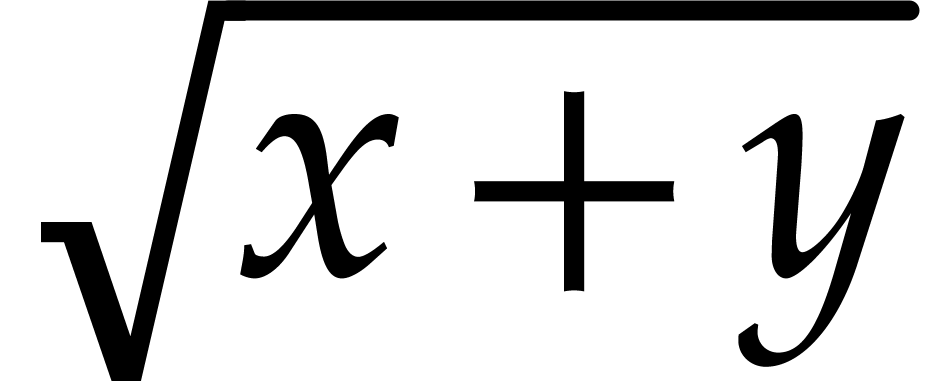 is simply represented as
whereas the fraction 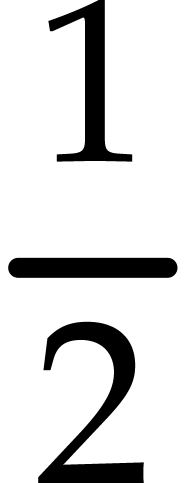 is represented as
<frac>
  <tm-arg>1</tm-arg>
  <tm-arg>2</tm-arg>
</frac>
In the above example, the whitespace is ignored. Whitespace may be preserved by setting the standard xml:space attribute to preserve.
Special tags
Some tags are represented in a special way in XML. The 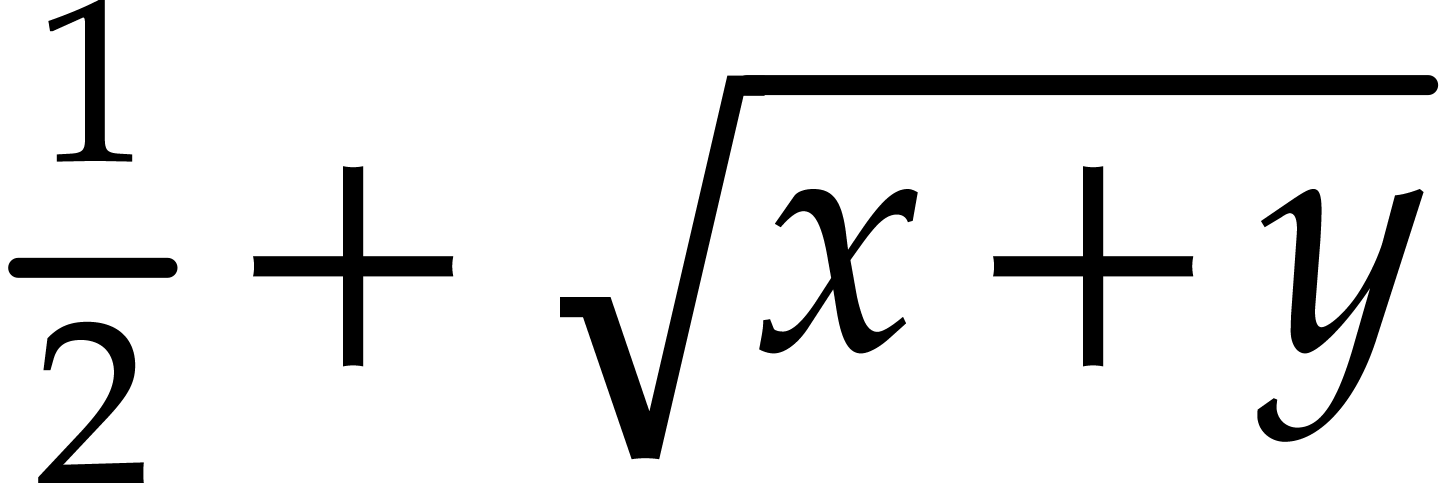 is represented as
<frac><tm-arg>1</tm-arg><tm-arg>2</tm-arg></frac>+<sqrt>y+z</sqrt>
The
Ik ben de blauwbilgorgel.
Als ik niet wok of worgel,
is represented as
<quote-env>
  <tm-par>
    Ik ben de blauwbilgorgel.
  </tm-par>
  <tm-par>
    Als ik niet wok of worgel,
  </tm-par>
</quote-env>
A
some <with color="blue">blue</with> text
Conversely, TeXmacs provides the
some <mytag beast="heary">special</mytag> text
would be imported as “some <my-tag|<attr|beast|heary>|special> text”. This will make it possible, in principle, to use TeXmacs as an editor of general XML files.
5.Scheme
serialization
Users may write their own extensions to TeXmacs in the
(with "mode" "math" (concat "x+y+" (frac "1" "2") "+" (sqrt "y+z")))
The
In order to save or load a document in
In order to copy a document fragment to an email in
(insert '(frac "1" "2"))
inserts the fraction
| 1 |
| 2 |
at the current cursor position.
6.The typesetting process
In order to understand the TeXmacs document format well, it is useful to have a basic understanding about how documents are typeset by the editor. The typesetter mainly rewrites logical TeXmacs trees into physical boxes, which can be displayed on the screen or on paper (notice that boxes actually contain more information than is necessary for their rendering, such as information about how to position the cursor inside the box or how to make selections).
The global typesetting process can be subdivided into two major parts (which are currently done at the same stage, but this may change in the future): evaluation of the TeXmacs tree using the stylesheet language, and the actual typesetting.
The typesetting primitives are designed to be very fast
and they are built-in into the editor. For instance, one has
typesetting primitives for horizontal concatenations (
The stylesheet language allows the user to write new
primitives (macros) on top of the built-in primitives. It contains
primitives for defining macros, conditional statements, computations,
delayed execution, etc. The stylesheet language also
provides a special
It should be noticed that user-defined macros have two aspects. On the one hand they usually perform simple rewritings. For instance, the macro
<assign|seq|<macro|var|from|to| >>
>>
is a shortcut in order to produce sequences like  .
When macros perform simple rewritings like in this example, the
children var, from
and to of the
.
When macros perform simple rewritings like in this example, the
children var, from
and to of the
<assign|square|<macro|x|<times|x|x>>>
serves an exclusively computational purpose. As a general rule, synthetic macros are sometimes easier to write, but the more accessibility is preserved, the more natural it becomes for the user to edit the markup.
It should be noticed that TeXmacs also produces some auxiliary data as a byproduct of the typesetting product. For instance, the correct values of references and page numbers, as well as tables of contents, indexes, etc. are determined during the typesetting stage and memorized at a special place. Even though auxiliary data may be determined automatically from the document, it may be expensive to do so (one typically has to retypeset the document). When the auxiliary data are computed by an external plug-in, then it may even be impossible to perform the recomputations on certain systems. For these reasons, auxiliary data are carefully memorized and stored on disk when you save your work.
7.Data relation descriptions
The rationale behind D.R.D.s
One major advantage of TeXmacs is that the editor uses general trees as its data format. Like for XML, this choice has the advantages of being simple to understand and making documents easy to manipulate by generic tools. However, when using the editor for a particular purpose, the data format usually needs to be restricted to a subset of the set of all possible trees.
In XML, one uses Data Type Definitions (D.T.D.s) in order
to formally specify a subset of the generic XML format. Such a
D.T.D. specifies when a given document is valid for a
particular purpose. For instance, one has D.T.D.s for
documents on the web (
In TeXmacs, we have started to go one step further than
D.T.D.s: besides being able to decide whether a given
document is valid or not, it is also very useful to formally describe
certain properties of the document. For instance, in an interactive
editor, the numerator of a fraction may typically be edited by the
user (we say that it is accessible), whereas the URL of a
hyperlink is only editable on request. Similarly, certain primitives
like
A Data Relation Description (D.R.D.) consists of a Data Type Definition, together with additional logical properties of tags or document fragments. These logical properties are stated using so called Horn clauses, which are also used in logical programming languages such as Prolog. Contrary to logical programming languages, it should nevertheless be relatively straightforward to determine the properties of tags or document fragments, so that certain database techniques can be used for efficient implementations. At the moment, we only started to implement this technology (and we are still using lots of C++ hacks instead of what has been said above), so a more complete formal description of D.R.D.s will only be given at a later stage.
One major advantage of the use of D.R.D.s is that it is not necessary to establish rigid hierarchies of object classes like in object oriented programming. This is particularly useful in our context, since properties like accessibility, inline-ness, etc. are quite independent one from another. In fact, where D.T.D.s may be good enough for the description of passive documents, more fine-grained properties are often useful when manipulating documents in a more interactive way.
Current D.R.D. properties and applications
Currently, the D.R.D. of a document contains the following information:
-
The possible arities of a tag.
-
The accessibility of a tag and its children.
In the near future, the following properties will be added:
-
Inline-ness of a tag and its children.
-
Tabular-ness of a tag and its children.
-
Purpose of a tag and its children.
The above information is used (among others) for the following applications:
-
Natural default behaviour when creating/deleting tags or children (automatic insertion of missing arguments and removal of tags with too little children).
-
Only traverse accessible nodes during searches, spell-checking, etc.
-
Automatic insertion of
document ortable tags when creating block or tabular environments. -
Syntactic highlighting in source mode as a function of the purpose of tags and arguments.
Determination of the D.R.D. of a document
TeXmacs associate a unique D.R.D. to each document. This D.R.D. is determined in two stages. First of all, TeXmacs tries to heuristically determine D.R.D. properties of user-defined tags, or tags which are defined in style files. For instance, when the user defines a tag like
<assign|hi|<macro|name|Hello name!>>
TeXmacs automatically notices that 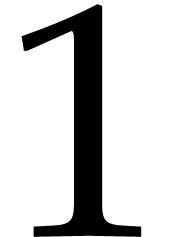 to be the only possible arity of the
Sometimes the heuristically defined properties are inadequate. For
this case, TeXmacs provides the
8.TeXmacs lengths
A simple TeXmacs length is a number followed by a length unit, like 1cm or 1.5mm. TeXmacs supports three main types of units:
- Absolute units
-
The length of an absolute unit like cm or pt on print is fixed.
- Context dependent units
-
Context-dependent length units depend on the current font or other environment variables. For instance, 1ex corresponds to the height of the “x” character in the current font and 1par correspond to the current paragraph width.
- User defined units
-
Any nullary macro, whose name contains only lower case roman letters followed by -length, and which returns a length, can be used as a unit itself. For instance, the following macro defines the dm length:
<assign|dm-length|<macro|10cm>>
Furthermore, length units can be stretchable. A stretchable length is represented by a triple of rigid lengths: a minimal length, a default length and a maximal length. When justifying lines or pages, stretchable lengths are automatically sized so as to produce nicely looking layout.
In the case of page breaking, the page-flexibility
environment provides additional control over the stretchability of
white space. When setting the page-flexibility
to , stretchable spaces behave as usual. When
setting the page-flexibility to 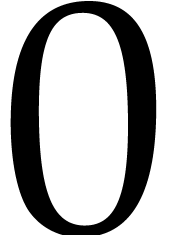 , stretchable spaces become rigid. For other values, the
behaviour is linear.
, stretchable spaces become rigid. For other values, the
behaviour is linear.
Absolute length units
-
cm -
One centimeter.
-
mm -
One millimeter.
-
in -
One inch.
-
pt -
The standard typographic point corresponds to
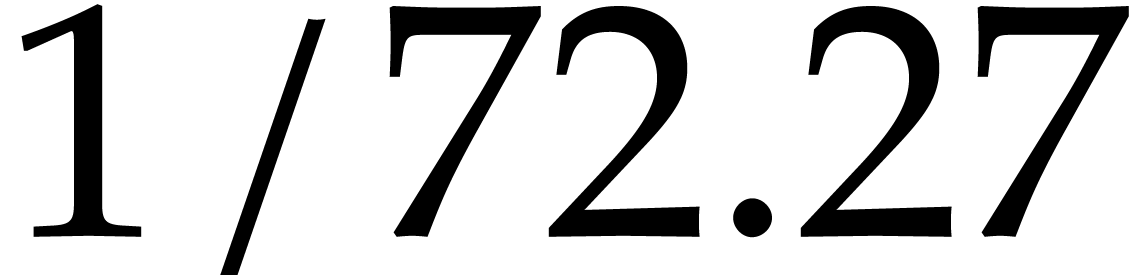 of an inch.
- bp
-
A big point corresponds to
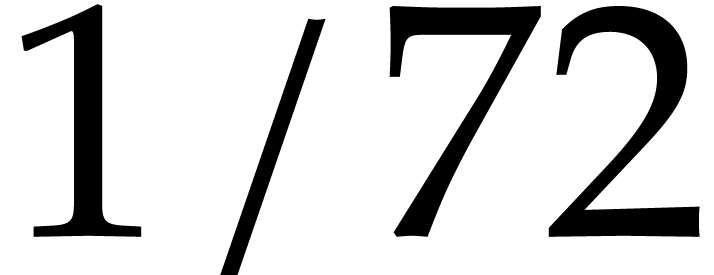 of an inch.
- dd
-
The Didôt point equals 1/72 of a French inch, i.e. 0.376mm.
- pc
-
One “pica” equals 12 points.
- cc
-
One “cicero” equals 12 Didôt points.
Rigid font-dependent length units
- fs
-
The font size. When using a 12pt font, 1fs corresponds to 12pt.
- fbs
-
The base font size. Typically, when selecting 10 as the font size for your document and when typing large text, the base font size is 10pt and the font size 12pt.
-
ln -
The width of a nicely looking fraction bar for the current font.
-
sep -
A typical separation between text and graphics for the current font, so as to keep the text readable. For instance, the numerator in a fraction is shifted up by 1sep.
- yfrac
-
The height of the fraction bar for the current font (approximately 0.5ex).
- ex
-
The height of the “x” character in the current font.
- emunit
-
The width of the “M” character in the current font.
Stretchable font-dependent length units
-
fn -
This is a stretchable variant of 1quad. The default length of 1fn is 1quad. When stretched, 1fn may be reduced to 0.5fn and extended to 1.5fn.
- fns
-
This length defaults to zero, but it may be stretched up till 1fn.
- bls
-
The “base line skip” is the sum of 1quad and par-sep. It corresponds to the distance between successive lines of normal text.
Typically, the baselines of successive lines are separated by a distance of 1fn (in TeXmacs and LaTeX a slightly larger space is used though so as to allow for subscripts and superscripts and avoid a too densely looking text. When stretched, 1fn may be reduced to 0.5fn and extended to 1.5fn.
-
spc -
The (stretchable) width of space character in the current font.
- xspc
-
The additional (stretchable) width of a space character after a period.
Box lengths
Box length units can only be used within some special markup elements,
such as
-
w -
The width of the box.
- h
-
The height of the box.
-
l -
The logical left
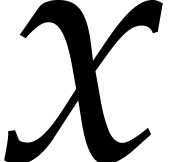 -coordinate of the box.
-
r -
The logical right
-coordinate of the box.
-
b -
The logical bottom
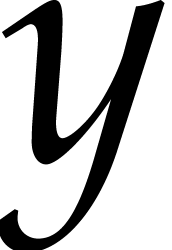 -coordinate of the
box.
-coordinate of the
box.
-
t -
The logical top
-coordinate of the box.
For instance, the code
<move|Hello there||<plus|-0.5b|-0.5t>>
can be used to center Hello there at the base-line.
Other length units
-
par -
The width of the paragraph. That is the length the text can span. It is affected by paper size, margins, number of columns, column separation, cell width (if in a table), etc.
- pag
-
The height of the main text in a page. In a similar way as par, this length unit is affected by page size, margins, etc.
-
px -
One screen pixel, the meaning of this unit is affected by the shrinking factor.
-
tmpt -
The smallest length unit for internal length calculations by TeXmacs. 1px divided by the shrinking factor corresponds to 256tmpt.
Different ways to specify lengths
There are three types of lengths in TeXmacs:
- Simple lengths
-
A string consisting of a number followed by a length unit.
- Abstract lengths
-
An abstract length is a macro which evaluates to a length. Such lengths have the advantage that they may depend on the context.
- Normalized lengths
-
All lengths are ultimately converted into a normalized length, which is a tag of the form <
tmlen |l> (for rigid lengths) or <tmlen |min|def|max> (for stretchable lengths). The user may also use this tag in order to specify stretchable lengths. For instance, <tmlen|<minus|1quad|1pt>|1quad|1.5quad> evaluates to a length which is 1quad by default, at least 1quad-1pt and at most 1.5quad.