Overview
General
Question 1. What
is TeXmacs?
Answer. GNU TeXmacs
-
is a free scientific text editor, which was both inspired by TeX
and GNU Emacs.
-
allows you to write structured documents via a wysiwyg
(what-you-see-is-what-you-get) and user friendly interface.
-
lets you create new styles.
-
implements high-quality typesetting algorithms and TeX fonts,
which helps you to produce professionally looking documents.
-
is suitable as an interface for computer algebra systems, as the
high typesetting quality goes through for automatically generated
formulas.
-
can be highly customized as it supports the Guile/Scheme extension language.
-
lets you export your documents to PS and PDF and offers both
import and export to HTML, LaTeX, Scheme, Verbatim and Xml. We
would very much appreciate your help for writing and
improving converters for TeXmacs documents.
Question 2. For
what typical purposes do people use TeXmacs?
Answer. TeXmacs can be used for
-
Books and Articles. They can be written fully within TeXmacs. If
your publisher requires a certain LaTeX style for an article, then
as a last step you can export your document to LaTeX and make the
final modifications there.
-
Presentations.
-
Interface to computer algebra systems and other scientific
software.
-
Webpages. For example the TeXmacs webpage is maintained as TeXmacs
documents, which are exported to Html.
Question 3. What
Operation Systems are supported?
Answer. TeXmacs can be easily installed on all
major systems, such as GNU/Linux, MacOS
and Windows. There are rpm
and Debian packages as well as binaries available for Linux.
For Mac OS X there is a Fink
package. For MS Windows, a Cygwin
package is available.
Question 4. What
are the system requirements?
Answer. A reasonably fast machine is
recommended. Having said this, I (Andreas) am typing this on a Pentium
III 450Mhz under Cygwin, and TeXmacs is still useable here, although
not overly reactive.
Question 5. I
have already learned TeX/LaTeX and Emacs, do I
have to learn all over again?
Answer. You will find out, that much
LaTeX-knowledge can be reused. For example, you can start a section by
typing \section[return] or you get 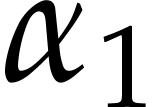 by typing $\alpha_1$. Note that
there are even shorter ways provided, for example $a[tab]$
gives you an alpha as well, so you might want to migrate after a
while. Styles like article, book or seminar, as known from LaTeX, are
provided as well. Furthermore, many Emacs
shortcuts like Ctrl+XCtrl+S
for saving a file, or Ctrl+_ for undo will work.
by typing $\alpha_1$. Note that
there are even shorter ways provided, for example $a[tab]$
gives you an alpha as well, so you might want to migrate after a
while. Styles like article, book or seminar, as known from LaTeX, are
provided as well. Furthermore, many Emacs
shortcuts like Ctrl+XCtrl+S
for saving a file, or Ctrl+_ for undo will work.
Question 6. I
have a question, where should I ask it?
Answer. The best place is the TeXmacs user
mailing list. Search this list and the FAQ beforehand, to ensure your
question was not asked before.
Question 7. Is
it free Software?
Answer. TeXmacs falls under the GNU public
licence.
Question 8. When
will TeXmacs be based on Qt5 and Guile 2?
Answer. TeXmacs already works quite well with
Qt5, but several issues remain to be fixed. TeXmacs 2.1 will still be
based on Qt4, but TeXmacs 2.2 will be based on Qt5.
As to Guile, please be aware that Guile
1 and Guile 2 carry the same name, but that
resemblances very much end there: Guile 2 has a
completely different design, which breaks the interface with TeXmacs.
Porting our interface to Guile 2 requires a lot
of work and it is possible that this will never be done. Since Guile 1 is no longer supported by many standard Linux distributions, recent versions of TeXmacs
directly include Guile 1. We will continue to do
so until we find time to switch to a more recent version of Guile or to another Scheme
implementation.
Troubleshooting
Question 9. TeXmacs
used to work, but suddenly refuses to be launched. What should I
do?
Answer. Something strange must have happened.
You may try the following remedies, in the given order:
-
Try to open TeXmacs with the –setup option:
-
Rename your ~/.TeXmacs directory (you may also
delete it, but that will irrevocably destroy all your preferences)
and relaunch the editor. If you use Windows, then we note that you
have no ~/.TeXmacs directory, but the hidden AppData\Roaming\TeXmacs subdirectory of your home
directory plays the same role.
-
Try reinstalling TeXmacs, preferably the latest version that used
to work for you. Old versions can be found at https://ftp.texmacs.org/TeXmacs/tmftp/
-
Submit a bug report, report the issue to one of our mailing lists,
or contact the authors.
System Appearance and Behavior
Question 10. How
can I see the LaTeX or TeX code corresponding to what I see on the
screen?
Answer. This question is due to a fundamental
misunderstanding about TeXmacs. Indeed, TeXmacs is not based
on TeX/LaTeX, although it does support (not yet perfect)
conversion to and from LaTeX. Furthermore, in theory at
least, there is actually no need anymore to look at something like the
TeX source, since TeXmacs is guaranteed to be fully WYSIWYG.
Conversion to LaTeX may only be useful, when transmitting an accepted
paper to the publisher of a journal.
Question 11. Trying
to start TeXmacs remotely over a ssh connection, I get an error, while
e.g. xclock works without a problem?
Answer. If you get an error message including
the following:
Fatal error: I failed to connect to Xserver in
'x_display_rep::x_display_rep
then execute export DISPLAY=127.0.0.1:10.0 on the
remote machine and make sure your /etc/hosts file is sound,
i.e. it contains the line 127.0.0.1
localhost and the IP information about the local and remote
machine.
Question 12. TeXmacs
is unusually slow while editing?
Answer. Graphics card drivers with poor 2D
performance can slow TeXmacs down tremendously.
If you are running TeXmacs under X on a system with an ATI graphics
card and are using ATI's proprietary drivers (the driver called fglrx), you can achieve a significant speedup by
-
either running an X server such as Xgl that performs 2D
operations using the 3D API of the graphics card driver,
-
or switching to an open source graphics card driver such
as ati or radeon which have a far
better 2D performance than fglrx.
Note that if you try both at the same time, you will slow your system
down even more, instead of speeding it up.
Windows and Cygwin specific
Question 13. My
Windows username contains spaces. Will this cause problems?
Answer. It is strongly recommended to have a
Windows username without spaces. Please make a new account, as simply
changing the username could be insufficient.
Question 14. What
to do with Cygwin specific questions?
Answer. Look at the Cygwin FAQ at http://cygwin.com/faq.html,
the Cygwin User Guide at http://cygwin.com/cygwin-ug-net/
and search the Cygwin mailing list http://www.cygwin.com/ml/cygwin/.
Question 15. How
to associate .tm files with TeXmacs inside Cygwin?
Answer. Create a file texmacs.bat
with the following content:
    rem cmdow @ /hid
    c:\cygwin\bin\bash --login -c "texmacs \"‘cygpath -u "%1"‘\""
Ensure that it lies in your PATH. Now you can
associate .tm files with this batch file.
If you want to hide the black Cygwin window when TeXmacs is started,
then download cmdow from http://www.commandline.co.uk/cmdow/,
drop cmdow.exe e.g. in your C:\WINDOWS\system32
directory (this applies to Windows XP installed
on C:\) and uncomment (i.e. remove
“rem” from) the first line of texmacs.bat.
Question 16. How
to get spell checking working inside Cygwin?
Answer. Install the Cygwin package aspell.
Execute in a shell:
    cd /usr/bin
    ln -s /usr/share/aspell/ispell ispell
Usage
Question 17. How
to mark/select a whole paragraph?
Answer. Clicking once on a word will place the
cursor there, clicking twice marks this word, clicking thrice will
mark the paragraph and so on; eventually, the whole document will be
selected.
Question 18. Spell
checking always starts at the beginning of the document?
Answer. Mark a region, and spell checking will
be restricted to this selection.
Question 19. How
can I insert an OpenOffice.org table?
Answer.
-
Create a PostScript image of your table using OpenOffice
(File PrintPrint
to file). Name the file, for example,
“table1.ps”.
PrintPrint
to file). Name the file, for example,
“table1.ps”.
-
Convert the PostScript file to an Encapsulated PostScript file
(.eps) using ps2epsi in a shell.
Just type: “ps2epsi table1.ps table1.eps”.
-
Insert or link the image table.eps in the TeXmacs
document.
Question 20. How
can I insert the number of pages?
Answer. Put a label on the last page of your
document and use the pageref primitive in order to
produce the corresponding number.
Question 21. How
can I resize an image?
Answer. Put your cursor right behind the image
and edit the fields in the lowest icon bar. You may for instance set
the width to 5cm and the height to 27mm.
When leaving the width open, it will automatically be determined as a
function of the height (and vice versa). When leaving both fields
open, the image will be reproduced at its original size. Notice that a
width of 1par will span your image over the paragraph
width. The remaining two fields specify the  -offset
and
-offset
and 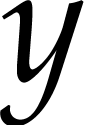 -offset of the image. By default, images
are aligned at the bottom. When specifying -0.5h for
the last field, the image will be vertically aligned at the center.
-offset of the image. By default, images
are aligned at the bottom. When specifying -0.5h for
the last field, the image will be vertically aligned at the center.
Microtypography
Question 22. There
is too much space after an abbreviation like wrt. or
etc.?
Answer. This is because TeXmacs thinks, that the
sentence ends after the dot in the abbreviation. To resolve this a
posteriori, mark the abbreviation and press Alt+A.
To care for this while writing: Alt+AETC. .
.
Question 23. How
to add unbreakable space?
Answer. Type Meta+/ after
the space.
Remaining legacy questions
Question 24. A
publisher sent me a giant LaTeX preamble I'm supposed to put in in
order to prepare a book for them. What is the best way of putting it
in and figuring if it will work?
Answer. I recommend to convert the preamble to
TeXmacs and to put the result in a TeXmacs style file. However, the
result will probably be disappointing, because conversion between
TeX/LaTeX and TeXmacs is not yet perfect and style files are
particularly problematic. What you can also do is write a TeXmacs
style file by your own which supports the major extra constructs you
want to use from the editors style file. When you convert your book to
LaTeX, you next use the editors style. Some layout will probably need
to be redone at that stage, but this should actually be the work of
the editor… Please look in the TeXmacs help for more
information about conversions between TeXmacs and LaTeX.
© 1999–2011 by Andreas Seidl, Joris van der Hoeven
 Frequently asked questions